
How to Play Diablo 1 on a Modern PC for Retro Hack and Slash Fun
Related Posts
Jason Fitzpatrick / How-To Geek
With the arrival of
Diablo IV
just around the corner, there is no better time to blow the dust off the first
Diablo
game to experience the original story. Better yet, you can play it with modern enhancements, previously unplayable characters, and more.
Why Play Diablo Now?
Diablo
was first released in January 1997 by Blizzard Entertainment but was a runaway best-seller even before it hit the shelves. The title was pre-ordered nearly half a million times leading up to the January release and then went on to sell more than a million copies by the end of the year. Within two years, it had sold two million copies.
The original spawned a successful franchise that includes
Diablo II
(2000),
Diablo III
(2012),
Diablo IV
(2023), and a mobile game,
Diablo Immortal
(2022). Even the expansions like
Diablo II: Lord of Destruction
(2001) and
Diablo III: Reaper of Souls
(2014) and
Rise of the Necromancer
(2017) were best-sellers. And in 2021, Blizzard released a completely remastered version of
Diablo II,
Diablo II: Resurrected
, which brought the 2000-era classic into the modern age.
With all those options, why play the original version now? You could certainly skip it and dive right into
Diablo IV
after its June 6, 2023 release. Or perhaps only play
Diablo III
to feel like you’re getting up to speed to enjoy
Diablo IV
.

Diablo
is an engaging dungeon crawler.
Despite the 1990s-era graphics, however,
Diablo
is still worth taking for a spin today. Not only are you playing a piece of action role-playing game (ARPG) that influenced the history of video game design (including
the best-selling ARPGs that came after it
, like
Path of Exile
,
Torchlight
,
Grim Dawn
, and more), you’re diving into the lore of the
Diablo
franchise.
And, all told, it’s not that long of a play experience. Playing through newer games in the series might take weeks (and optimizing your builds might take even longer), but you can play
Diablo
in a few evenings or over a long weekend.
On top of experiencing one of the most influential video games of the late 20th century, you’ll get to fill in the lore gaps and meet the game’s original cast. After all, how can you truly enjoy wielding Wirt’s Leg in
Diablo II
and
Diablo III
(and possibly in
Diablo IV
, too, if it makes an Easter egg appearance) without meeting Wirt himself?
So come for the old-school gritty dungeon crawler atmosphere, and stay for the insights into deep-cut references to early
Diablo
lore.
How to Play Diablo on a Modern PC
With a few tips and tricks, it’s easy to run
Diablo
on a modern Windows PC. Before we dig in, let’s mention one method that might seem like a simple approach but ends up being overly fussy and complicated.
If you happen to have an original game (as in the original CD-ROM based release) squirreled away in a closet somewhere, it’s a bit of a pain to take it from released-in-1997 status to playing-smoothly-now status.
You’ll need to get the data off the CD-ROM, install it in compatibility mode,
use a no-cd crack, patch the game (Blizzard still has the
last 2001-era
Diablo
patch available on its FTP server
), and then from there, you’ll have to patch and mod it just to get anywhere near where we’re going to start the process below.
Despite having a dusty copy of
Diablo
around here somewhere, I skipped that whole process, and you should too. Instead, we’ll use an updated copy of
Diablo
courtesy of Good Old Games (GOG.com) and then supercharge it with a really awesome open-source project.
Start by Grabbing a Copy from GOG.com
Instead of fussing with old CD-ROMs, ancient DRM, and scrounging the backwater of the internet for long abandoned patches, there is a much simpler way to play
Diablo
on a modern PC. Back in 2019, GOG reached an agreement with Blizzard to republish
Diablo
as part of its vast library of, well, good old games.
For a very reasonable $9.99, you can
pick up a copy of
Diablo
that includes the base game, the wildly popular expansion
Hellfire
, and some bug fixes and support for modern screen resolutions.
Here are the versions you can play with the GOG-repackaged
Diablo
installation:
-
Diablo
— This version includes modern bug fixes, high-resolution screen support, and LAN-based multiplayer (with support for up to 4 players). -
Diablo (Classic)
— This is the original
Diablo
frozen in time since 2001. It uses the original SVGA graphics, and you can still access Battle.net for old-school
Diablo
co-op pairing. You’ll even get a burst of nostalgia when the resolution resize shuttles your Windows desktop icons everywhere! -
Hellfire
— This version stacks the updated
Diablo
with the
Hellfire
expansion. There’s no Battle.net access (or multiplayer at all), but it supports high-resolution monitors.
A quick word on
Hellfire
because it’s not just a great add-on, but it has an interesting story too.
Hellfire
is a non-canonical expansion pack to the original
Diablo
game created by programmers at Synergistic Software, a division of the game industry titan Sierra Entertainment, in November of 1997.
How did this cross-development-studio expansion come to be? Blizzard had opted to focus on
Diablo II
, rather than an expansion pack for
Diablo
. But at the time, Blizzard and Sierra were both owned, at the time, by an umbrella company Comp-U-Card Internationa (CUC). While Blizzard had strong opinions about where its energy should be focused, CUC executives didn’t want to leave the runaway success of
Diablo
on the table while waiting for an entirely new second game.
It seems almost incomprehensible in the modern game and copyright climate for one publisher to release an expansion pack for another publisher’s best-selling intellectual property (even with the backstory about the parent company calling the shots). But Sierra and Blizzard developers met and agreed on how the expansion should take shape and what the limitations were out of respect for the
Diablo II
development arc. Thus
Hellfire
became an official but non-canonical addition to the
Diablo
universe. (You can read more about this on the
Diablo Wiki
.)
The expansion pack includes two new dungeons, a handful of additional quests, extra game items, a bigger and tougher final boss, and some interface improvements. It also introduces the Monk character class, which rounds out the basic
Diablo
roster of Warrior, Rogue, and Sorcerer. Although Blizzard restricted the Sierra developers from including more than one additional class in
Hellfire
, a Bard and Barbarian class is tucked away in the code. (In the next section, we’ll discuss how to play those hidden classes without modifying any files.)
You could
download
Diablo
from GOG
and stop there, enjoying the GOG
Diablo
launcher, the improvements, and the bundled
Hellfire
expansion. But I hope you won’t stop there because it’s unbelievably easy to modernize
Diablo
for a vastly better player experience.
Then Modernize Diablo with the DevilutionX Overhaul
While the simplicity of just dropping ten bucks on the GOG
Diablo
pack is tough to beat, there is a
Diablo
modernization project you must check out if you’re at all serious about giving
Diablo
a run-through.
The secret sauce is
DevilutionX
, a port of the original Diablo game engine. DevilutionX isn’t the complete game—you still need either the original
Diablo
disc or the GOG download to access key assets. But it’s a completely overhauled way to run the game that introduces a laundry list of welcome improvements. If you want the full run down, check out
the change log
and the
wiki manual
, but here are some highlights.
With DevilutionX,
Diablo
now supports both LAN play using TCP/IP and ZeroTier for easy remote play without any firewall rules (and these improvements are extended to
Hellfire
too). I’d recommend sticking to LAN play or remotely connecting to friends you’ve pre-planned a
Diablo
game with, however, as random remote
Diablo
matchmaking is about as hit or miss as you’d expect.
The full-screen high-resolution support is vastly better than the GOG version too. The GOG version will stretch out your view for widescreen if you want, but the DevilutionX version will properly scale it in a completely natural way despite the game’s native 4:3 resolution.
Additionally, there are tons of bug fixes that smooth things over behind the scenes. You can also modify keybindings, use a gamepad, run in town (you have no idea how slow walking in town feels until you can run), and automatically pick up gold, potions, and gear. There are plenty of other quality-of-life improvements like numerical values for your health and mana, as well as an experience bar.
And there’s a stash! Officially, the stash function didn’t appear in
Diablo
games until
Diablo II
. Believe it or not, the “stash” in the original game was just chucking your stuff on the ground like you were running a perpetual Medieval yard sale.
Diablo
players, a proper stash space.
Items didn’t despawn—so players would pile up their excess gear and potions in the empty spaces around town and go scavenging later. If that sounds awful, I can assure you it was. But it’s all we had, so we did it.
With DevilutionX, you can access your stash by talking to the townswoman Gillian. Not only will she hold your loot for you, but any gold you leave with her is accessible to any of the vendors in town, so you don’t have to carry it around. I know, I know, it sounds unbelievably archaic not to have a stash or a universal wallet, but remember
Diablo
came out last century.
But enough hyping DevilutionX, here’s how to take advantage of it on your Windows PC. First things first, you’ll need to install
Diablo
using
the GOG installer
so we can access those crucial assets. Without those assets, the port won’t work at all.
After installing the GOG version of
Diablo
,
install the latest windows-x86_64 version of DevilutionX
. It’s a portable app, so you merely need to extract the ZIP file to a location of your choosing.
Once you’ve extracted it, you must copy five key files from the
Diablo
installation directory to the DevilutionX directory. If you used the default GOG installation directory, all the files are located in
C:GOG GamesDiablo
.
The first file,
DIABDAT.MPQ
, is found in the root of the install directory—this is the core
Diablo
game pack. The rest of the files,
hellfire.mpq
,
hfmonk.mpq
,
hfmusic.mpq
, and
hfvoice.mpq
, are in
/Diablo/hellfire/
.
Copy all of them into the root directory where you extracted the DevilutionX files. When you’re done, the directory should have the five highlighted MPQ files, as seen below.
Here’s a fun bit of trivia about the MPQ file format. It’s a propriety file format used in Blizzard games named after former Blizzard company director and lead programmer Mike O’Brien. The file extension is a shortened version of “Mo’PaQ” which is a shortening of “Mike O’Brien’s Pack. ” The file type was developed for
Diablo
and used in all subsequent Blizzard games.
With your Mike O’Brien Packs in place, you can run
devilutionx.exe
to launch the game. You can choose to play it as-is right out of the gate—a more or less vanilla experience with a properly scaled full-screen experience, bug fixes, and an improved UI and keybindings. Or, if you’d like, you can jump right into the settings before your first playthrough and toggle all those features mentioned above, like automatic gold pickup and more.
If you opt for the super-enhanced experience, don’t forget to toggle on the “Test Barbarian” and “Test Bard” options in the settings menu. This will enable the Barbarian and Bard classes for both
Diablo
and
Hellfire
(though the Monk class will only appear in
Hellfire
).
Some Beginner Diablo Tips to Keep You Alive
Older video games are often punishing in ways that surprise people unfamiliar with old game conventions and limitations, and
Diablo
is no exception. So rather than leave you to flail about, here are some solid beginner tips that will make picking up
Diablo
for the first time (or after 20+ years) a wee bit easier.
Talk to everyone.
Quests are triggered by conversations. If you don’t talk to townspeople, you’ll wander around bored and pondering if you should look up a
Diablo
walkthrough. If it feels like nothing is happening, you didn’t talk to enough people.
Everything happens in town.
You might be used to expansive modern games, but
Diablo
is more compact. The entire game takes place in the town of Tristam and the dungeons and catacombs under it. Don’t waste time trying to break free from the town to go galavanting about, all the action is close to home.
Poke around everywhere.
There is a map when you’re in dungeons (hit the TAB key to engage the overlay). But the map only shows basic stuff like wall borders, doors, and stairways. Unlike modern games with active quest markers,
Diablo
requires you to poke around to find everything. Don’t overlook cracks in the wall or things that look out of place.
Save your game frequently.
Quick save, when playing with DevilutionX, is F2. There are no auto-saves. If you forget to save for an hour and die, that’s an hour of progress lost. Super frustrating if you found a good weapon, as weapon drops are random.
Use choke points and terrain to hold enemies back.
Although you never see it on the screen,
Diablo
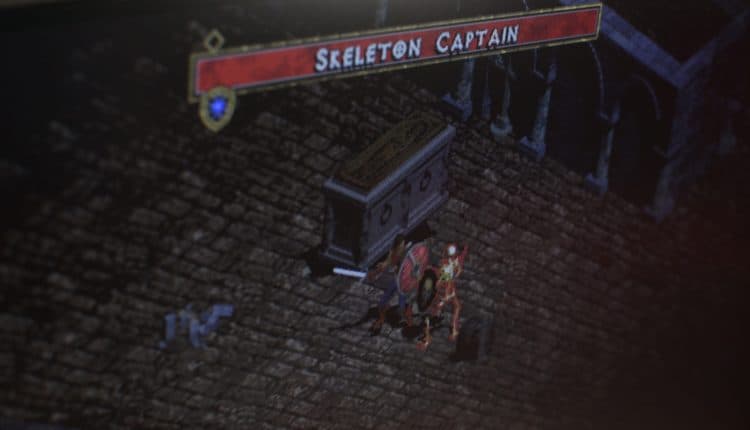
uses a chess-board-like movement grid (possibly a remnant of the original early-development turn-based design). Enemies will come at you on this grid, and if you position yourself just outside a door frame or behind a sarcophagus, you can keep them from surrounding you.
Use town portals liberally.
Always keep at least one town portal scroll handy. Without a town portal, you’ll spend an unbearable amount of time backtracking through levels you’ve already cleared. And if you’re roughed up, popping right back to town to visit the healer Pepin and buy more potions is a must.
Repair your gear.
In the beginning, when you’re using basic loot you scooped off the dungeon floor spending money on repairs doesn’t make a lot of sense—the next wooden club or generic dagger is right around the corner. But as soon as you get better gear, pay attention to the durability and have Griswold the blacksmith repair it.
Don’t let Wirt hustle you.
On the north side of town, there’s a young merchant named Wirt. He charges you 50 gold to see his newest and greatest find. But in the early game, it’s not even worth looking at because his loot is too expensive for you to buy.
Further, the item only renews if you buy the old one or go adventuring in the dungeons and level your character to an even-numbered level. Looking at his inventory ten times in a row hoping for something new will waste 500 gold for nothing.
Read the manual.
It’s been ages since video games have come with extensive manuals, but
Diablo
hails from a videogame era when substantial manuals were part of the experience (and game designers expected you to read them). Sure, you could just read Diablo wikis online or Google random questions, but if you’re going all-in on the retro experience, you should check out the manual that comes packaged with the GOG download.
Diablo
manual is filled with artwork and page after page of game lore.
Blizzard Entertainment
It’s nearly 80 pages of game instructions, tips, artwork, and extensive
Diablo
lore. It’s a relic from an age when game designers couldn’t possibly fit everything they wanted into the game itself and used supplemental materials to finish fleshing things out. If you take the time to read through the manual, you’ll see references and foreshadowing of things that happen over the next twenty years of the
Diablo
franchise.
In the end, if you finish the original
Diablo
, great. But if you don’t, even wandering around to visit the townspeople and a partial run-through paired with a look at all the lore in the old manual will give you an appreciation for the franchise (and all the little references and Easter eggs in the later games).
