
A One-Thumb-Up Hybrid Headset – Review Geek
Related Posts
Price:
$319
Jason Montoya / Review Geek
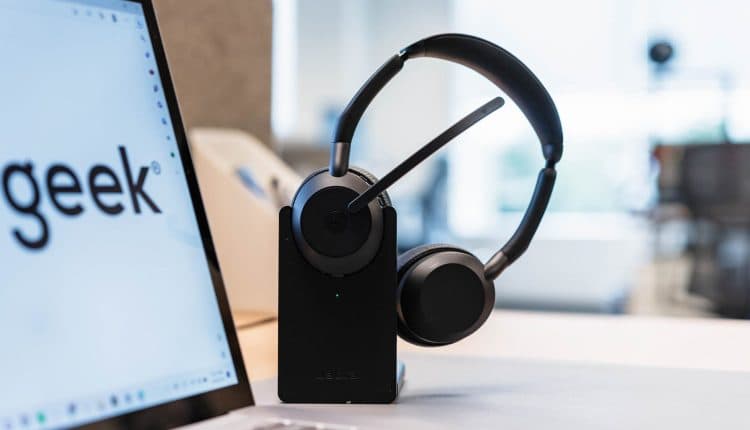
The Jabra Evolve2 55 Stereo Wireless Headset may not look like much, but even discerning audiophiles will be surprised by the sound staging and rich highs and lows that this product delivers. And when it comes to comfort, this is the only headset I would use for a long day of calls and meetings.
Here’s What We Like
- Superb sound quality
- Very comfortable
- Solid battery life
- Sound+ app is loaded with customizations
And What We Don’t
- Weak noise-cancelling
- Issues with firmware updates
- Limited availability
Review Geek’s expert reviewers go hands-on with each product we review. We put every piece of hardware through hours of testing in the real world and run them through benchmarks in our lab. We never accept payment to endorse or review a product and never aggregate other people’s reviews. Read more >>
Design, Fit, and Comfort: Don’t Judge a Book by Its Cover

Jason Montoya / Review Geek
-
Headset Dimensions:
7.28 x 2.56 x 6.89in (185mm x 65mm x 175mm) -
Headset Weight:
0.29lbs (130g) -
Charging Stand Dimensions:
4.57 x 0.94 x 2.76in (116mm x 24mm x 70mm)
The
Jabra Evolve2 55
measures 7.28 inches tall, 6.89 inches from the left cup to the right cup, 2.56 inches from front to back, and weighs 0.29 pounds. The charging stand is 4.57 inches tall, 2.76 inches wide, and 0.94 inches from front to back (when collapsed). Both the headset and charging stand are shelled in a matte-black ABS plastic casing.
The Evolve2 55 headset is rather unassuming at first glance. Your traditional volume adjusters and command key are mapped to perforated buttons on the top of the right ear cup, with a noise-canceling toggle placed behind the headband. There’s also a power/Bluetooth button at the bottom of the right cup, right next to the headset’s USB charging port. Conveniently, the Evolve2 55 can be purchased in both USB-A or USB-C configurations, a preference that also carries over to the charging dock. My own review unit was the USB-C version.
Jason Montoya / Review Geek
Speaking of configurations, Jabra gives you a choice when it comes to what kind of media your
Evolve2 55 is optimized for, including “Unified Communication” and “Microsoft Teams” options. My review model was Teams-optimized, which replaces the standard call-answering button on the exterior of the right cup with a Teams button instead. If you’re the kind of person that’s always attending Teams meetings, a single press of the Teams button will patch you into your next conference in seconds flat.
Rounding out the look and feel of the Evolve2 55 are two of my favorite design elements: the attached boom-arm microphone and Jabra’s Air Comfort technology. Seeing as the Evolve22 55 is meant to handle everything from music and podcasts to massive conference calls, there’s a handy noise-canceling microphone at the end of that swinging boom. If you’re not into the look, unfortunately, you can’t remove it, but that rotating boom has a few tricks up its sleeve. When you receive a phone call, flipping the boom down toward your mouth will automatically answer the call. During a call, you can also mute the microphone by flipping the boom back toward your noggin.
Jason Montoya / Review Geek
Then there’s Air Comfort, which is really nothing more than a leatherette-covered padding fitted to both the left and right ear cups and the part of the headband that connects with your head, or at least that’s what I first thought. Jabra’s Air Comfort is actually a marvel of perfectionist form-fitting that helps to relieve pressure to both your ears and head while wearing the Evolve2, and as someone who’s constantly wearing a set of
Bluetooth headphones
for work and leisure, I can’t begin to express how amazing Air Comfort really is. I love my usual everyday wear, the
Sony WHCH710N
, but my right ear starts to fatigue after only 15 minutes or less of wear time, which presents as a burning and itchy inner-ear sensation. During the weeks I tested the Evolve 2 55, I probably wore them for four to five hours a day and
never
experienced discomfort of any kind.
Oh, and one last thing before we move on; When I first got my hands on the Jabra Evolve2 55, I was a little concerned with how lightweight they felt. Personally, I’ve been conditioned over the years to connect heft with power and performance, but this is a consumer tech superstition I should really make an effort at parting ways with. Regardless of the fact that the cans clock in at just over a quarter of a pound, the kind of sound quality the Evolve2 achieves totally surpassed my expectations (more on that in a bit).
Connectivity, Pairing and Battery Life: The Best Handshake Ever
Jason Montoya / Review Geek
-
Connectivity:
Bluetooth, USB-C, USB-A (Link 380 only) -
Bluetooth Version:
5.2 -
Bluetooth Operating Range:
Up to 100 feet (30m) -
Music Battery Life:
Up to 18 hours (ANC disabled)/Up to 15 hours (ANC enabled) -
Call Battery Life:
Up to 16 hours (ANC disabled)/Up to 10 hours (ANC enabled)
The Jabra Evolve2 55 uses the Bluetooth 5.2 standard, with support for AAC and SBC audio codecs. You can have up to eight Bluetooth devices paired to the headset and two simultaneous Bluetooth connections at one time. Pairing the headset is a very straightforward process. Simply power the Evolve 2 on, then press and hold the power/Bluetooth pairing button for around four seconds until the headset says you’re ready to connect a new Bluetooth device. Then, just head into the Bluetooth menu of your mobile device or laptop, locate the headset, and tap/click connect, pair, or whatever other “handshake” lingo your hosting hardware uses.
I had zero issues pairing the Evolve2 55 to my iPhone 12 and 2021 MacBook Pro, and even though the initial connection to my computer kicked the Evolve2 55 off my iPhone, once I re-paired it, the headset claimed I was connected to two devices at once.
The Evolve2 55 also comes with
Jabra’s Link 380 Bluetooth adapter
, a USB-A dongle that acts as a glorified amplifier for your Bluetooth connection. And with support for Bluetooth 5.0 and HD Voice, the Link 380 enhances everything from overall sound and call quality to Bluetooth operating range. Personally, I didn’t notice too much difference in sound and call quality when using the adapter instead of a direct device connection, but I imagine it’s a great tool for a hectic workplace.
Jabra claims that the Bluetooth operating range is up to 100 feet when using the Link 380, although the only time you’ll probably ever get close to these three digits is in a completely obstruction-free environment. But guess what? Jabra proved me wrong again.
For my first connectivity experiment, I had the Evolve2 55 connected to my iPhone 12 directly (no Link 380). I left the phone in my living room and left my apartment, walking as far away from my building as I could. As I continued to gain distance, I kept thinking, “Okay,
this
is when the headset is going to cut out,” but the Evolve2 kept on playing the white-noise track from my iPhone. It wasn’t until I was pretty much 90 to 100 feet away from my building that I finally lost the connection, and once I was about 50 feet away from my apartment on my way back home, the headset reconnected to my phone.
That is the best Bluetooth range I’ve ever experienced from
any
device and an important feature for bustling office environments where you may have to jump up from your desk to run down to your colleague’s cubicle at the other end of the room while keeping your phone and laptop at your own workstation.
Now as far as battery life goes, Jabra claims you’ll get up to 18 hours of music time with ANC disabled and up to 15 hours with ANC toggled on. As for call time, you should get up to 16 hours with ANC turned off and up to 10 hours with ANC enabled. Based on my time with the headset, I can definitely stand behind these claims. At times, I even surpassed Jabra’s expectations, getting around 17 hours of music listening with ANC enabled, although I was playing my tunes at a relatively low volume. I also appreciated the quick boost of power you’ll get from the USB-C charging station or a direct USB-C connection, which Jabra claims will get you from zilch to 50% battery in only half an hour.
Noise-Cancelling Capabilities: The One Sore Spot
I
so
badly wanted to write incredible things about the Evolve2 55’s
active noise-canceling
(ANC) features, but I’ve got to be honest, the ANC doesn’t work that well. It’s a real bummer, but no matter how badly I wanted ANC to filter out environmental sounds like HVAC systems, vacuum cleaners, and my noise machine, the headset struggled with pretty much every kind of ANC test I threw its way. I even had the ANC adjuster cranked all the way up in the Jabra Sound+ app (available for
iPhone
and
Android
), but everything from oscillating fans to passersby had me checking if I even had ANC enabled at all.
Unfortunately, this ANC debacle carries over into everyday listening and phone calls, too, which is a real shame when you hear what I have to say about the actual sound and call quality overall (both are fantastic). But yeah, no matter what tweaks I made or the listening environments I put myself in, the Evolve2 55 did very little to block out the kind of sounds you don’t want to hear when watching a movie or listening to tunes. This was particularly frustrating when trying to make a phone call outdoors on a windy day, with the Evolve2 doing next to nothing to cut down on the gusts that kept interrupting my conversation.
Sound Quality: Boldly Go Where No Headset Has Gone Before
Jason Montoya / Review Geek
In terms of overall audio performance, the Evolve2 55 is one of the best stereo headsets I’ve ever tested, and that was before I even dove into the Sound+ app to tweak a few settings. By default, the 28mm speakers produce a crisp and clear sound with excellent high-frequency articulation and a surprising amount of low-end. I say surprising because, again, I’m super-conditioned to believe that headphones with good bass should feel heavy, but that’s just not the case here. I ran the Evolve2 55 through several media tests and was beyond pleased with the results every time.
My girlfriend and I like to use the Roku Mobile App for the handy private listening function, which kicks off your TV speakers and sends movie and TV show audio to whatever wireless or wired headphones are paired to your mobile device. We’re Disney fans here, so we thought we’d give
Peter Pan & Wendy
a watch using the Evolve2 55. I’ve found that Disney+ and audio mixes can be pretty hit or miss, with dialogue dialed too far down and way too much emphasis placed on background music and sound effects, and I’ve experienced these off-balance sound profiles across multiple streaming devices on both old and new Disney content. So it makes me an extra-happy camper to be able to say that the Evolve2 55 eradicated most of my typical Disney+ grievances.
The opening scene of the latest “Peter Pan” reimagining is an introduction to the Darling family, where we follow a wooden sword-dueling John and Michael as they play-fight their way up to bed. The dialogue for each sibling was centered and sharp, with each sword parry receiving proper spotlighting on the soundstage. Behind all this action is your typical Disney orchestral score, which the Evolve2 55 did a great job at zeroing in on. Individual instruments were discernible and pleasant-sounding, but no section of the orchestra was ever too prominent or distracting. Oh, and there’s a thunderstorm raging outside, too, with each crash and rumble getting a good amount of mid and low-frequency representation (especially those rumbles).
A later sequence finds Peter and the Darlings evading the cannon fire of Captain Hook’s ship. With such a bombastic situation at hand, I was fully prepared for the Evolve2 55 to under- or over-represent some part of the swashbuckling, but I was proven wrong yet again. From the cacophony of screaming pirates to the bass-loaded blasts of each cannonball, the Evolve2 let the scene sound just as epic as it looked.
Over in the world of music, the Jabra Evolve2 55 did just as good of a job. Metallica’s big and bold self-titled record (known by fans as “The Black Album”) is always a solid go-to when it comes to testing any kind of headphones. Bob Rock’s idea of radio-friendly Metallica presents as more foot-stomping than head-banging, with a song like “Sad but True” serving as a prime example. The percussive feel of the track gained new ground through the Evolve2 55, with every guitar and bass chug delivered with extra strength and clarity. When James Hetfield starts singing, his vocals become the sound-stage priority, which the Evolve2 did an excellent job at isolating amidst the hard-hitting instrumentation.
For some easier listening, Paramore’s “This is Why” is a disco dance party that sounded all the more kinetic and energized through the Evolve2 55. Everything from guitar and bass to vocals was crisp and punctual, enhancing the overall groove of the tune. Opting for more of an indie-rock vibe on the latest album, one of the biggest changes is the way drummer Zach Farro mixed his kit. The result, for most tracks, is better highlighting of his playing style, especially when compared to some of the band’s more anthemic drumming of records past. But I don’t know if I ever would have clocked this kind of detail without the Evolve2 55. Honing in on every snare hit, shuffled fill, and high-hat accent, Farro’s understated approach hasn’t sounded as good on any of my other headphones.
Call Quality: As Good as It Gets with Poor ANC
It’s one thing for music and other media to sound great through a headset, but when you’re talking about a set of cans with a dedicated microphone, we should expect big results. Fortunately, the Evolve2 55 doesn’t disappoint in this integral category either, although the lack of sufficient ANC capabilities did raise a few roadblocks along the way.
On the listener’s end, regular phone calls and virtual meetings sound nice and clear. Other than adjusting the volume a few times, I didn’t have to make any EQ adjustments, although I did experiment with a few cool features that the Evolve2 55 is capable of. Located in Jabra’s Sound+ app under “Call Experience,” the “Call Quality” menu lets you choose from three caller profiles: “Neutral (the default setting),” “Treble,” and “Bass.” As one might imagine, switching to Treble mode adds a sheen of high-frequency brightness to caller voices, which I thought made it easier to hear what the caller is actually saying. I found the Bass mode to be a little less impressive, with the deepening of dialogue and certain environmental sounds being a bit too distracting for my liking.
The Evolve2 55 also includes a feature called Sidetone that isolates your own voice during a phone call while filtering out things like office chatter, passing traffic, and other hard-to-ignore noises. In the Sound+ app, you can toggle Sidetone on and off, as well as adjust how much isolation is applied to your voice. I kept my own isolation at around the two-thirds-full mark, which gave me a nice balance of caller articulation and plenty of clarity for my own speaking voice.
I think it’s also impressive that Jabra thought to add noise-canceling to the Evolve2 55’s microphone (proprietary engineering billed as Jabra Clearvoice), but unfortunately, this doesn’t amount to much. Those speaking with me reported that my voice sounded low and faded as if I had a bad connection. I’m wondering if maybe Jabra will be able to fix some of these ANC troubles with a firmware update. And speaking of updates…
The Jabra Sound+ App: Take Your Evolve2 to the Next Level
Jason Montoya / Review Geek
-
Compatibility:
iPhone/iPad, Android -
Works With:
Microsoft Teams, Alexa, Android Fast Pair
Jabra’s Sound+ app (available for
iPhone
and
Android
) isn’t just your typical headphone companion tool. In fact, when it comes to fine-tuning the audio and overall performance of your Evolve2 55, you’re missing out on several great features and customizations if you don’t take at least a dive or two into Jabra’s awesome app.
When your Evolve2 55 is powered on and paired to your mobile device, the Home Screen of the app will give you a readout of the headset’s remaining battery life, along with noise cancellation adjustments, a music equalizer, several music presets, background soundscapes and a toggle for the headset’s in-call busylight (the headset’s LED will light red when you’re in the middle of a call). You’ll also see an option for performing a firmware update at the top of the Home Screen, but for some reason, I could never download the actual update. Every time I tried, I would get an error message that the installation failed. I even rebooted my phone, headset, and the app several times, but to no avail. Maybe there’ll be a firmware update…to fix the firmware updates.
Tap the “Settings” icon at the top-right corner of the screen to get into the real meat and potatoes of customization. On the Settings screen, you’ll be able to adjust all kinds of headset settings for audio, calls, and general usage, from whether or not music will still play when HearThrough (Jabra’s version of Ambient listening) is enabled to how long it will take the Evolve2 to enter Sleep mode. My favorite customization is a feature called MySound, a calibration tool that optimizes the headset based on how well you hear certain test tones. Once completed, you’ll be able to use this sound profile for all listening media and let me say there was quite a difference between music with MySound enabled and MySound disabled. The former was simply better in every way, from overall sound staging to high and low-frequency nuances.
At the bottom of the Home Screen is a ribbon with three menu options. Tapping the “Discover” icon (the lightbulb) will let you do things like register your Evolve2 headset and access the quick-start guide and a digital version of the user manual. Tapping the “About Sound+” icon (the “i” in the middle of a circle) will give you a link to Jabra’s support team, as well as other useful info like what software version the headset is running and a link to Jabra’s privacy policy.
Should You Buy the Jabra Evolve2 55?
Personally, I think $319 is a little too much to ask for a headset that doesn’t fully deliver. Also, as of the publication of this review, the headset is totally sold out at Jabra, and Amazon has the item listed as temporarily out of stock.
Price:
$319
Here’s What We Like
- Superb sound quality
- Very comfortable
- Solid battery life
- Sound+ app is loaded with customizations
And What We Don’t
- Weak noise-cancelling
- Issues with firmware updates
- Limited availability
