Best mechanical keyboards in 2023
Related Posts
A keyboard plays a fundamental role in human-computer interactions to this day. The underpinnings for the best Chromebooks and desktop keyboards have evolved significantly since the days of the IBM Model M, but they often trade cost-effectiveness for tactility and audible feedback. Mechanical keyboards have always existed along the sidelines, and are a great way to bring some pop and thock back into your typing experience. There are a bunch of options at various prices, and we have curated the best ones for you.
A good keyboard for your Chromebook goes beyond visual appeal and typing feel. It can have health benefits if you use it for long hours, double up as a nice tabletop work of art, or an ode to the keyboards from the early days of computing. Whatever your preference may be, there’s a mechanical keyboard on this list for you. Going forward, you may need a rudimentary understanding of the mechanical keyboard terminology like the difference between tactile and linear switches. We cannot explain all the related terms here for the sake of brevity, but it’s hard to go wrong with any of the following keyboards, if you are clear about what you want.
Our favorite mechanical keyboards in 2023
Keychron Q1 V2
Best overall
For an unbeatable typing experience
Q1 is one of Keychron’s newer models. It features a double gasket mount mechanism that eliminates the pinging noise and hollowness associated with CNC-machined aluminum keyboards, while allowing enough plate flex for a soft typing experience. Dampening between the circuit board (PCB) and switch plate and inside the case also quietens a keyboard. Keychron pre-installs damping foam, making the Q1 suitable for shared spaces like offices and universities.
Pros
- Comes with Mac keycaps, spare gaskets, and tools
- QMK & VIA support
- Programmable knob
- Hot-swappable with three and five-pin switches
Cons
- South-facing LED backlight sub-optimal for most shine-through keycaps
- Wired connectivity only
- Fixed typing angle
- Interference on larger keycaps like MT3
Although advertised as a 75% board, The Keychron Q1 is not to be confused with a TKL, which is also a 80% layout. The Q1 includes a few nav cluster keys in the usual spot, but vertically stacked, along with a customizable knob. This board also works well with Mac, and Keychron includes Mac keycaps in the box. The default keycaps go well with the board but can be swapped out for virtually any set because the south-facing switches eliminate any chance of switch-keycap interference. However, south-facing LED backlighting is sub-optimal for illuminating most shine-through keycaps with north-facing legends.
Keychron makes the Q1 of machined aluminum and a steel plate for switch mounting. It doesn’t include flip-out feet for fear of making an expensive board even costlier. So, you are stuck with the fixed typing angle defined by the case. If you prefer personalizing your keyboard further, Keychron includes all the necessary tools. The keyboard is also sold in a barebones configuration, only consisting of the PCB, chassis, and tools. You can provide your own key switches and keycaps if you have identified your preferences.
All the switches are hot-swappable, meaning you can pull them out and replace them, even when the keyboard is operating. Hot-swap support eliminates the hassle of soldering if switches go bad. Because of the unique double gasket design and other premium features, the Keychron Q1 is a versatile choice for mechanical keyboard enthusiasts who seek a no-nonsense solution. It works perfectly with minimal modification or tuning for acoustic goodness, but it may not be the ideal board if you dislike muted keyboards.
Drop Signature Series TKL
Premium pick
Typing can be a treat to the senses
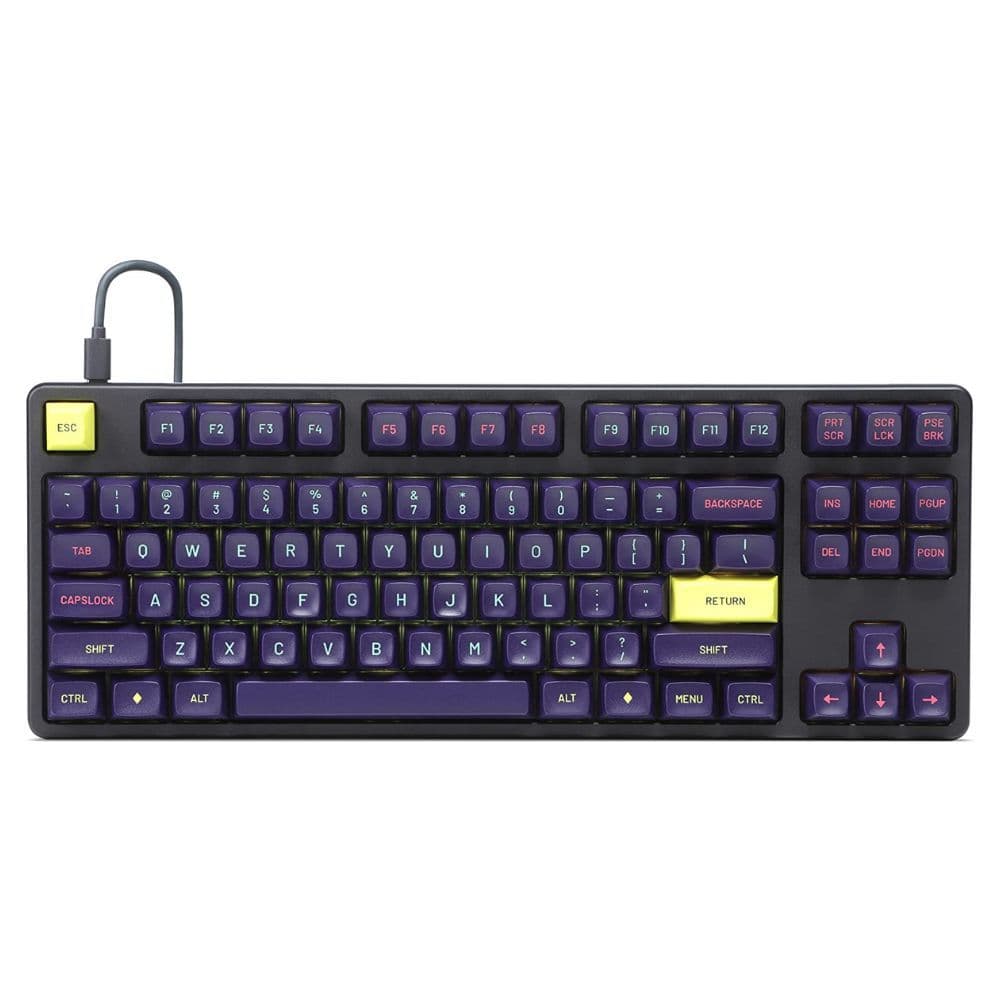
The Drop Signature Series mechanical keyboard has tall and sculpted MT3 profile keycaps or popular GMK colorways. The chassis is retained from Drop’s popular all-aluminum Alt tenkeyless (TKL) board, so you have a hefty keyboard that doesn’t slide around or compromise the aesthetic. The layout lacks a dedicated NumPad, but keeps most other keys in their familiar locations, so switching to the Signature Series TKL shouldn’t be difficult.
Pros
- Heavy body doesn’t slide around
- Enthusiast-grade switches and keycaps
- USB-C pass-through
- Three-year warranty and soft carry case included
Cons
- Tall profile could induce fatigue without a wrist rest
- Fixed typing angle
- Lacks dedicated programmable macro keys
- Backlighting serves as underglow and doesn’t shine through
If you’ve been following the mechanical keyboard space for a while, you are familiar with Drop. The brand started as “Massdrop” and has earned repute for high-end keyboards and MT3 profile keycaps. These keycaps deliver the ultimate typing experience, and some are double shot (two subsequent injection molds), so the legends don’t wear out with use. However, all MT3 profile sets don’t allow RGB backlighting to shine through, making the
feature
a mere cosmetic add-on for the Signature Series.
The Signature Series’ TKL design translates into additional usable desk space for mouse movement. Although this isn’t a lightweight keyboard at nearly 4 pounds fully built, if you love it enough, Drop includes a soft carry case to take this board with you.
The Signature Series’ CNC-machined aluminum body has sufficient mass to deliver a muted typing experience, especially if you prefer linear or tactile switches. However, you are stuck with a fixed six-degree typing angle because machining flip-out feet would have driven the $350 sticker price even higher. On the bright side, the keyboard has two USB-C ports and a detachable cable for connection, and even when one port is in use, the other will still function like a USB hub, thanks to USB pass-through
technology
. With firmware-level customization options through QMK, god-tier switch choices, a three-year warranty, and a carry case included, there’s little to dislike about the Drop Signature Series.
Redragon K552
Best value
All the good options on a tight budget
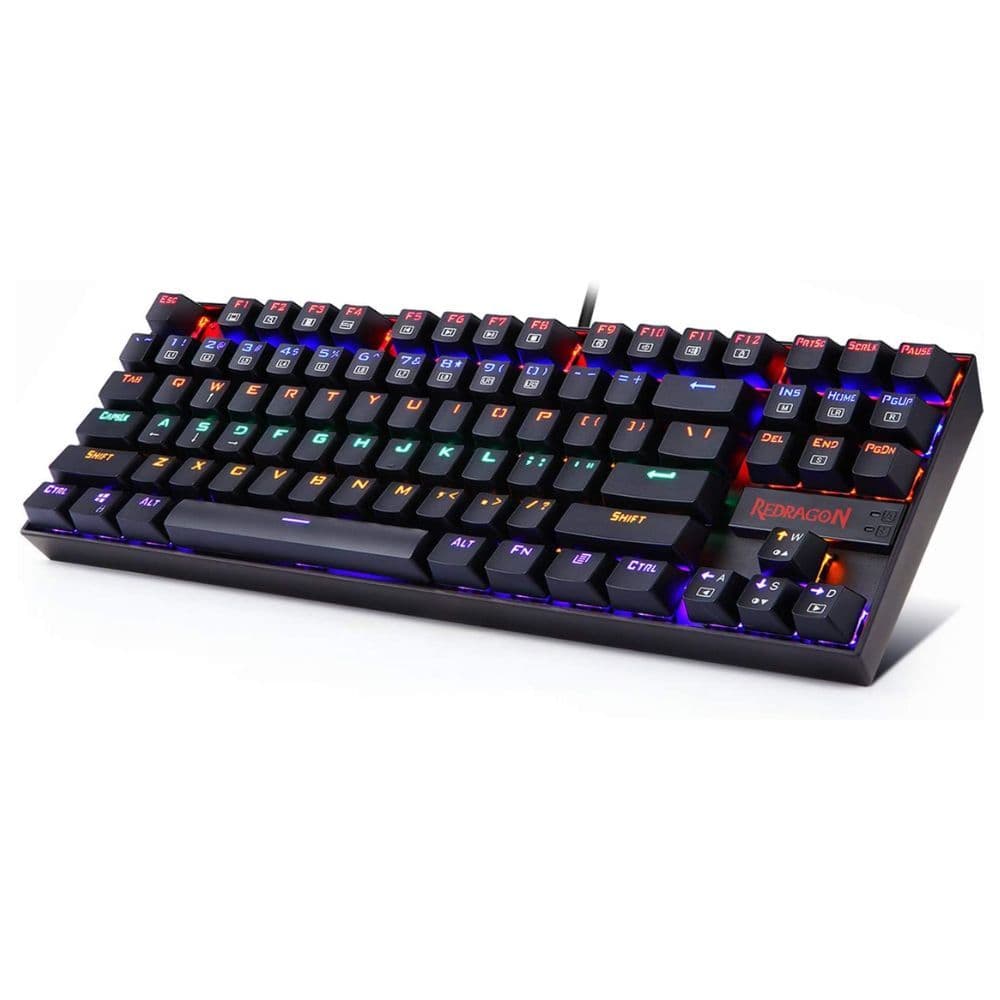
The Redragon K552 offers a value proposition few others can rival. It incorporates a standard TKL 80% layout, hot-swappable switches, customizable RGB lighting, and flip-out feet to customize the typing angle. To keep the sticker price attractive, Redragon makes a few compromises, like the all-plastic build and limited switch compatibility with the hot-swap sockets. Nonetheless, this makes for a great first mechanical keyboard on a budget.
Pros
- Barely costlier than a membrane keyboard
- Hot-swappable
- Features an aluminum plate despite low price
Cons
- Hot-swap sockets only work with select switches
- Non-detachable cable
- Rattly stabilizers for larger keys
No-brand mechanical keyboards are a dime a dozen, but they usually struggle to offer reliability and value as the Redragon K552 does. On paper, it has all the features traditionally associated with boards costing multiple times as much, and Redragon doesn’t let you down. The body is all plastic, but the steel plate adds rigidity and heft to the board. Since there is very little mass, the board may sound hollow, but you can add dampening material to help. The case also has flip-out feet to change the typing angle conveniently. Redragon doesn’t provide a detachable cable, which is a bummer, but it’s certainly a compromise we can live with for the $38 price.
The hot-swap sockets made by Outemu are another limitation. These support slightly slimmer switch pins, so although the board is hot-swap ready, your choices are limited to Outemu, Gazzew, and Akko CS switches, to name a few — but Gateron, Kailh, and Cherry switches won’t fit. It isn’t a major limitation but one you should know about. There are plenty of choices between these compatible brands, and you can always make
frankenswitches
if you like.
Although the price screams otherwise, this is a sturdy, well-built keyboard for everyday use on a budget. For just a few bucks more than the price of a Logitech membrane keyboard, the Redragon is a nice option to see if you like mechanical keyboards or to identify your switch preference before purchasing a costlier board. Redragon was my first hot-swap keyboard, and a few years later, it’s still going strong. You can pick up this keyboard with clicky, tactile, or linear Outemu switches pre-installed, and with a black or white finish.
KBDfans Tofu60 2.0
New and improved
A small package with immense potential
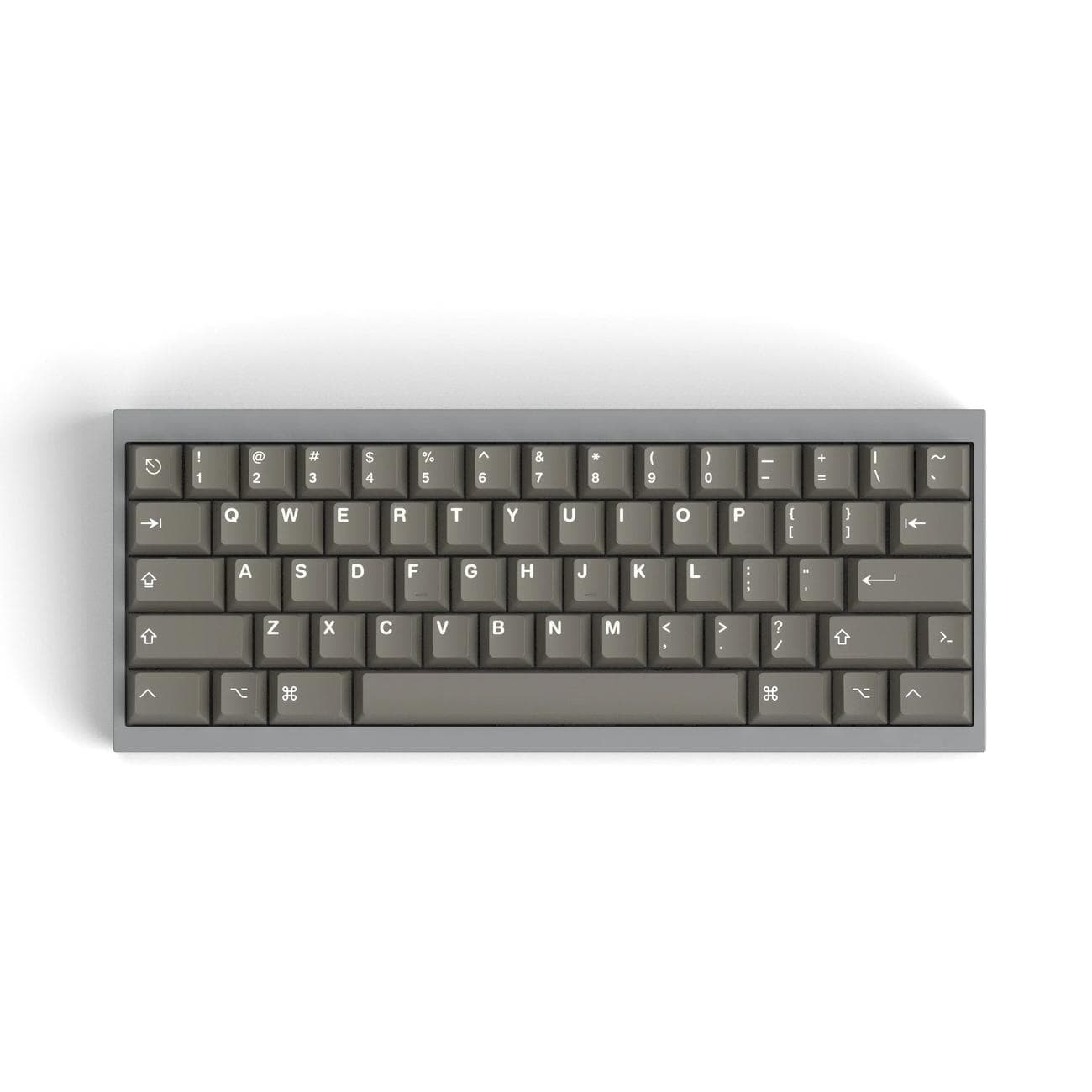
The Tofu60 2.0 is the second revision of the incredibly popular Tofu60, a 60% keyboard from KBDfans. Thanks to its attractive pricing, choice of layout, numerous mounting options, and a significantly enhanced range of chassis color options, the Tofu60 2.0 can be your first rodeo with a fully customizable 60% keyboard without breaking the bank.
Pros
- Well built with multiple colors and plate options
- Available barebones with support for multiple bottom row configurations
- Three different mounting styles
- Case design neatly conceals screws
Cons
- Could be intimidating to configure for a beginner
- Case finish may not be perfect on the inner corners
- Fixed typing angle
- Compact 60% layout may not suit everyone
The new Tofu60 2.0 is the successor of one of the best starter mechanical keyboards in recent memory,
the Tofu60
. KBDfans sold over 40,000 units since the keyboard’s launch in 2017, and version 2.0 sweetens the deal further. It includes many more color options for the aluminum case than its predecessor, two different finishes (electroplating and anodizing), and support for ANSI, ISO, WK, WKL, and HHKB layouts (with cases to match). The board also offers several other high-end features like QMK/VIA support, all for a rather affordable price.
The keyboard is sold as a barebones kit, with material options for the plate ranging from polycarbonate to carbon fiber. There’s no per-key RGB backlighting, but that is a forgivable feature considering everything else this board’s PCB has to offer, such as several mounting options and plate materials to tweak the firmness you feel when typing. The case is well-designed, with no visible screws or holes, even on the underside. The rubber feet for the keyboard neatly fit in the recessed screw holes (taking a page out of Geon’s playbook), lending the keyboard a premium feel, partly thanks to the additional brass weight.
However, as a downside of the e-coating process for the case, the inner corners of the board may not be coated. Also, with the plethora of plate, color, and layout options available, it could be an elephantine task to configure the board. Another notable issue is that the proprietary hot-swap PCB can result in switches seated sideways or even upside down, which may have an effect on sound and keycap gaps. However, to a buyer who knows their wants, the Tofu60 2.0 may easily be the perfect keyboard, thanks to exceptional room for customization backed by solid build quality; it’s really hard to go wrong with the Tofu60 2.0.
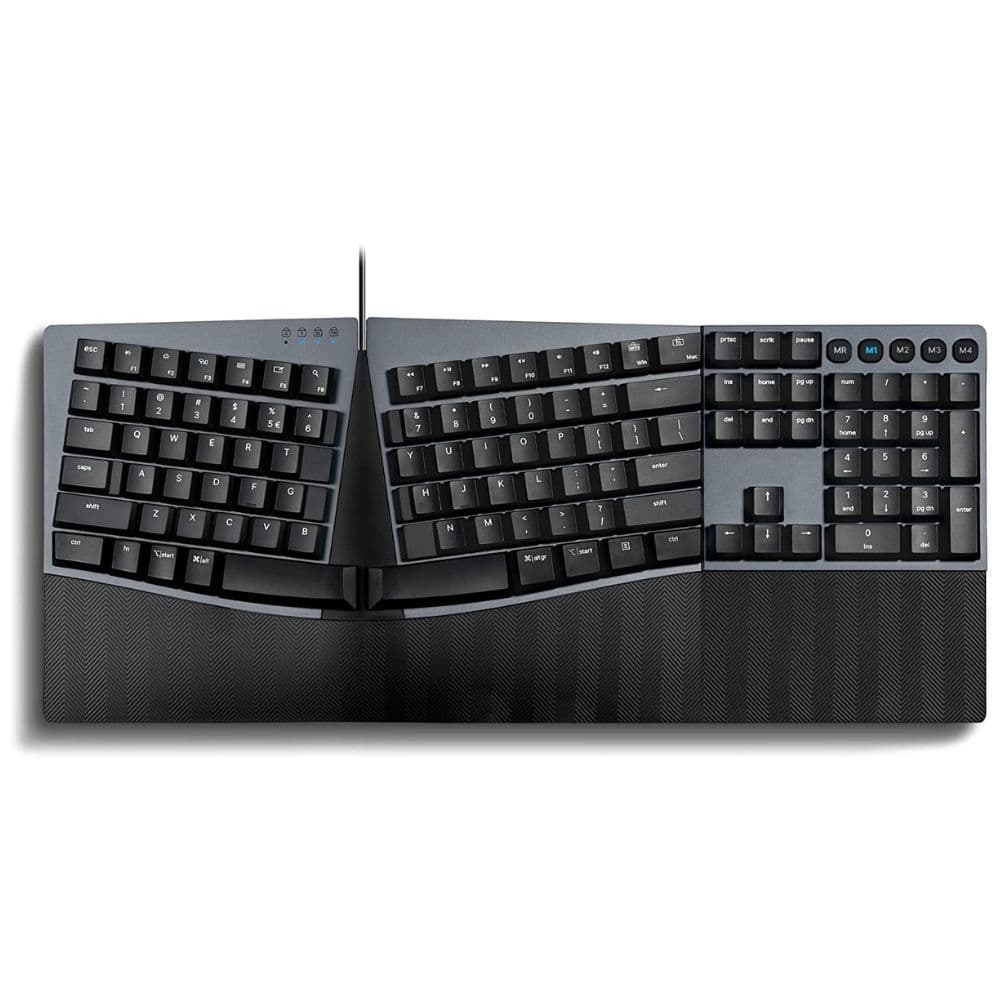
Perixx Periboard-535BR
Ergonomics first
Type comfortably for long hours
If you value ergonomics over everything else, this Perixx Periboard ticks all the right boxes. Its design helps reduce wrist extension, pronation, and ulnar deviation, making it a very comfortable keyboard if you can get used to it. The limited software customizability and great price make up for the non-detachable cable and the unique layout, which limits keycap compatibility.
Pros
- Focus on ergonomics
- Affordable pricing
- Negative tilt on wrist rest
- Dedicated macro keys
Cons
- Limited keycap customization options
- No hot-swap support
- Wired only
- No backlight
The 535BR uses a low-profile construction and low-profile Kailh switches to reduce wrist extension. The middle of the keyboard is higher than the sides, so you are less likely to develop Carpal Tunnel Syndrome because of wrist pronation for long hours. Plus, the Perixx comes with an integrated height-adjustable wrist rest for optimal comfort, even if you’re working on a standing desk.
Unlike most keyboards, the Periboard is split vertically down the middle. This reduces the outward twist for your wrists (ulnar deviation) but comes at the cost of a non-standard layout with a few odd keys. Combined with the choc switches and low-profile keyboard design, that severely limits your keycap choices. The switches are also soldered in, another point to remember if you plan to customize this keyboard. It is not hot-swappable, so you cannot swap out switches conveniently if they malfunction. There’s no backlighting either, and we aren’t too happy about that.
However, as a package, the Perixx Periboard is a cost-effective gateway into the ergonomic mechanical keyboard space, especially if you consider the other options available. This is certainly a board for heavy users who know their requirements and switch preferences. This keyboard may not be the best looking, but it promises a few years of comfortable use.
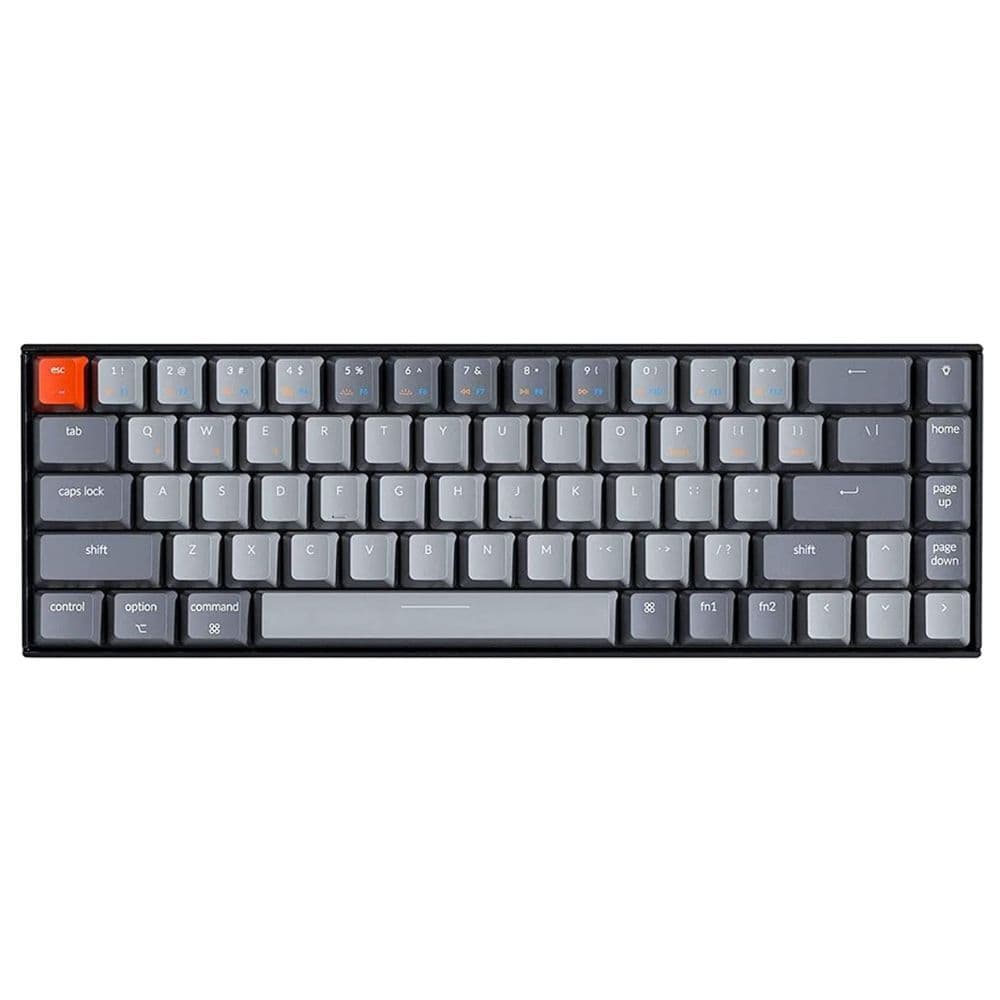
Keychron K6
Compact king
Smaller footprint without losing features
The Keychron K6 is well known in the mechanical keyboard community as a versatile, compact all-rounder, even if it doesn’t have stunning looks in its favor. The board has hot-swappable switches, three-device Bluetooth connectivity, and an ABS plastic body with an optional aluminum frame. In addition, it’s available with both mechanical and optical key switches, making it suitable for gamers and productivity enthusiasts.
Pros
- Connect up to three devices with Bluetooth 5.1
- Long-lasting 4,000mAh battery
- Spare Mac keycaps included
Cons
- Side-mounted USB-C could be inconvenient for some
- Six-key roll-over in Bluetooth mode makes it unsuitable for gaming
- No QMK and VIA support
The Keychron K6 is undoubtedly one of the best-known compact wireless keyboards out there. It has all the enthusiast-grade features like white or RGB backlighting, optional hot-swappable switches, and a compact 68-key layout. The board places all the important keys within easy reach, while all the other keys lacking dedicated buttons are accessible via key combinations. The design retains a standalone arrow key cluster, though, so you aren’t losing functionality.
The Keychron K6 ships with Gateron G Pro mechanical key switches with LK Optical switches offered as well. Optical switches are known for their faster response times than mechanical ones, but they are also more prone to failure if not cleaned regularly. On the subject of gaming, it is remiss to mention only six keys will register when pressed simultaneously in Bluetooth mode. The polling rate is also a dismal 90Hz instead of 1,000Hz in wired mode, rendering the board useless for gaming in wireless mode.
The K6 has a huge 4,000mAh battery and delivers respectable service life between recharges. This keyboard also comes with Mac keycaps in the box, like most Keychron boards. The plastic construction with two-stage flip-out feet may be a disadvantage if you’re looking for a premium keyboard, but make no mistake, the Keychron is a sturdy, well-built product. The K6 is a great buy if you’re looking for a reliable keyboard that works right out of the box. If you want a knob like the one on the Keychron Q1, but the compactness of the K6, you could check out the K6 Pro. If you want a slightly larger board, the K8 is worth your perusal.
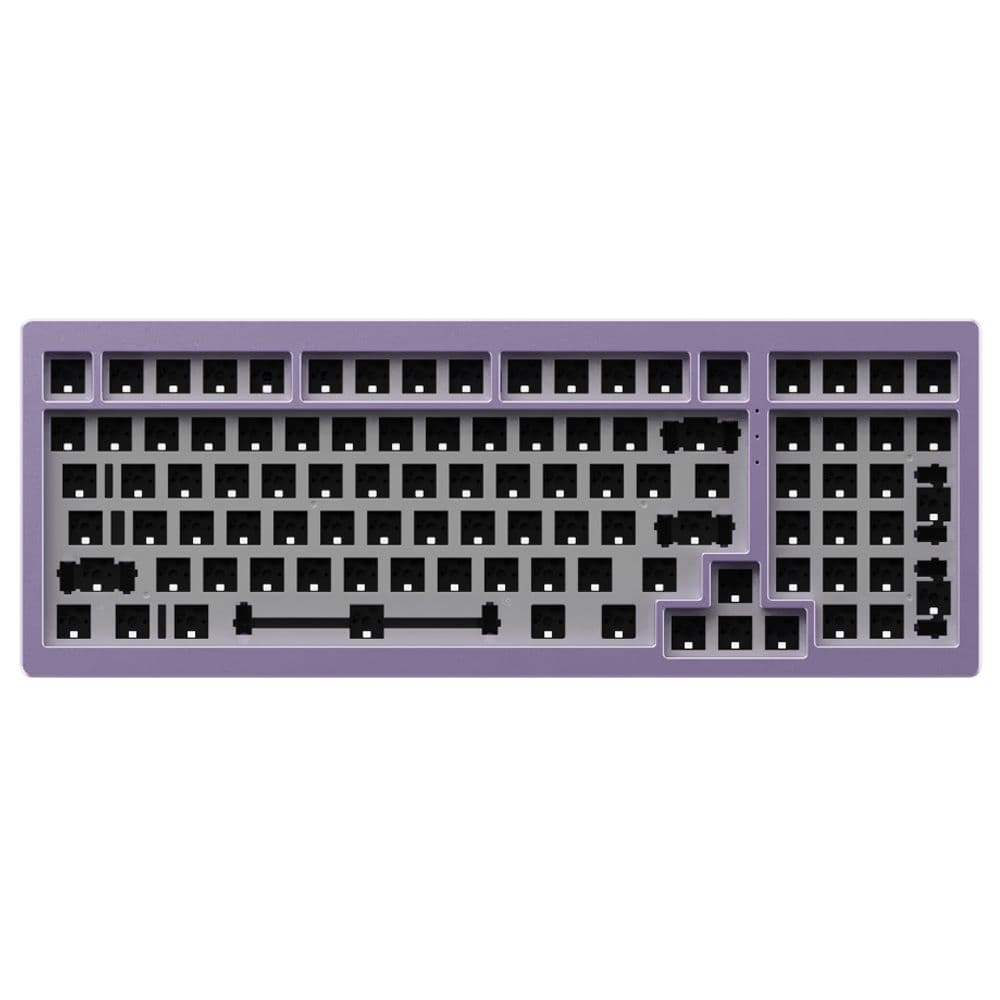
Monsgeek M2
For optimal productivity
A well-built value proposition
Monsgeek is an Akko sub-brand known for upper-mid-range mechanical keyboards. Its M series features all-aluminum beginner-friendly DIY kits. The Monsgeek M2 is no different, selling as a barebones kit with optional switch and keycap add-ons advertised on Monsgeek’s website. Alternatively, buyers can purchase this gasket-mounted board and configure it according to their preferences.
Pros
- Teflon pads, tape mod supplies, case foam included
- Polycarbonate plate from factory
- USB-C coiled cable included
- QMK firmware allows remapping with ease
Cons
- Tall profile could induce fatigue without a wrist rest
- Fixed typing angle
- Extremely heavy and non-portable
- USB-C connector is recessed and may not work with all cables
The Monsgeek M2 is an all-aluminum barebones keyboard aimed at the somewhat experienced hobbyist looking to try out a heavy board with ample room for customizability. The keyboard comes with two layers of case foam, a switch pad, plate foam, a polycarbonate plate, teflon pads for the force break mod, and tape for the tape mod on the back of the PCB, all of which can tune the keyboard’s sound profile. If you aren’t familiar, the force break mod particularly helps quieten down two-piece aluminum cases like the Monsgeek M2, and the tape mod makes any keyboard sound more poppy with just a little masking tape.
The M2’s layout is specifically designed for people who want a dedicated numpad and arrow key cluster without sacrificing desk space to the nav cluster. This layout is fairly common and standard, meaning it shouldn’t take much effort to switch to this keyboard or find third-party keycaps. The M2 is sold as a barebones unit, but you can option it with any switch and keycap set you prefer. However, remember that this is a heavy keyboard because of its all-aluminum body, and it isn’t the easiest to carry around.
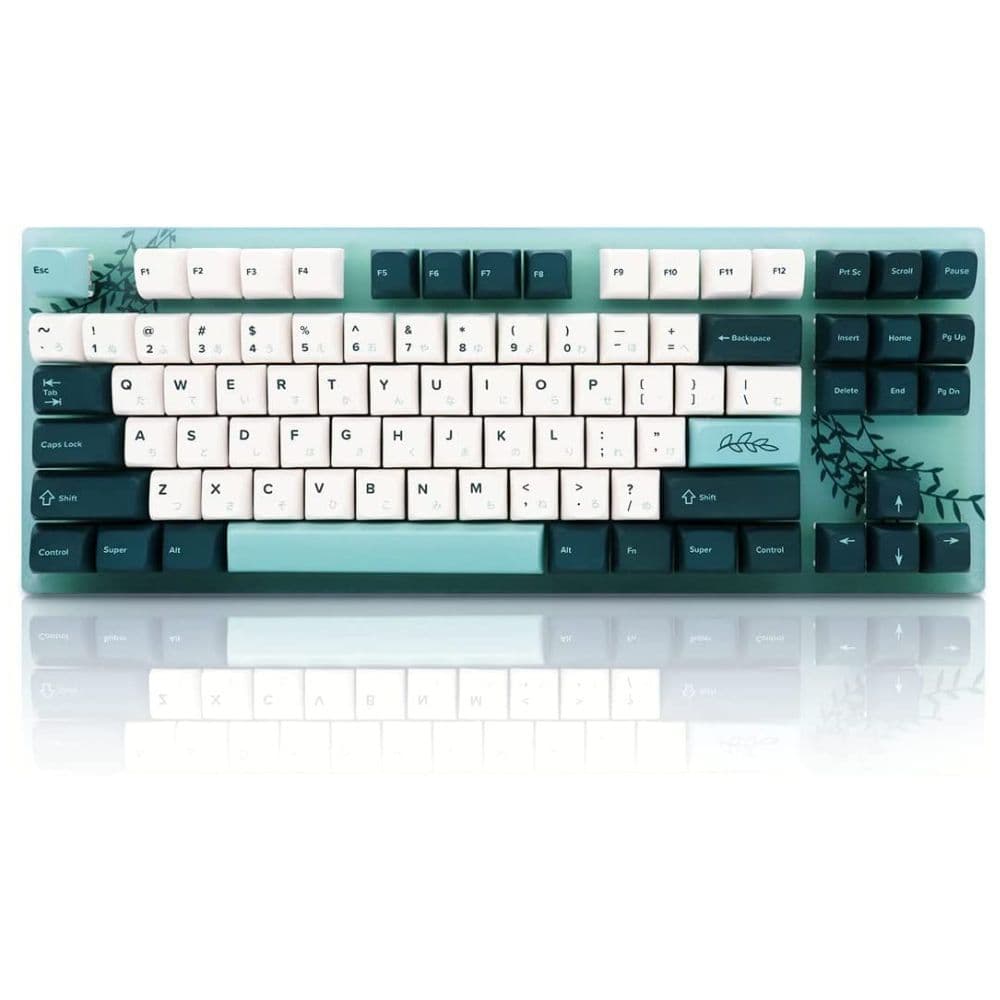
Womier K87
Shine bright
Acrylic and RGB – a match made in heaven
If you’re looking for an eye-catching keyboard that works as well as it looks, your search stops at the Womier K87. It has a clear acrylic case, a conventional TKL layout, per-key RGB backlighting, and hot-swappable sockets pre-populated with the Gateron G Pro switches also found on popular Keychron keyboards. It is available in many attractive colorways, so you can pick something matching your setup’s color scheme easily.
Pros
- Available with silent switches
- Hot-swappable PCB
- Acrylic body with RGB lighting looks unique
Cons
- Fixed typing angle
- No shine-through keycaps on some variants
- Acrylic could scratch easily
Made of clear acrylic, the Womier K87 keyboard allows the per-key RGB backlighting to shine through the body, making it the perfect addition to any RGB-laden setup. However, it is unfortunate that some models don’t have shine-through keycaps.
The acrylic case is as fragile as it is cool-looking. Exposure to mild chemicals like acetone, rubbing alcohol, and some cleaning agents tends to deform permanently or discolor acrylic. The material is softer than plastic and susceptible to scratches, so you may need to handle this keyboard with kid gloves to maximize its service life. Nonetheless, it packs several nice-to-haves at an affordable price, such as hot-swap sockets, the same Gateron G Pro switches Keychron swears by, and an option for silent switches. There’s no option for flip-out feet, which is a disappointment at this price and another indicator of acrylic’s fragility.
Womier aims the K87 at RGB-loving mechanical keyboard lovers, but nothing is holding it back from being your first mechanical keyboard. It comes at a low price, uses a conventional layout, and allows experimenting with switches to your heart’s content. There are very few points weighing against the Womier K87.
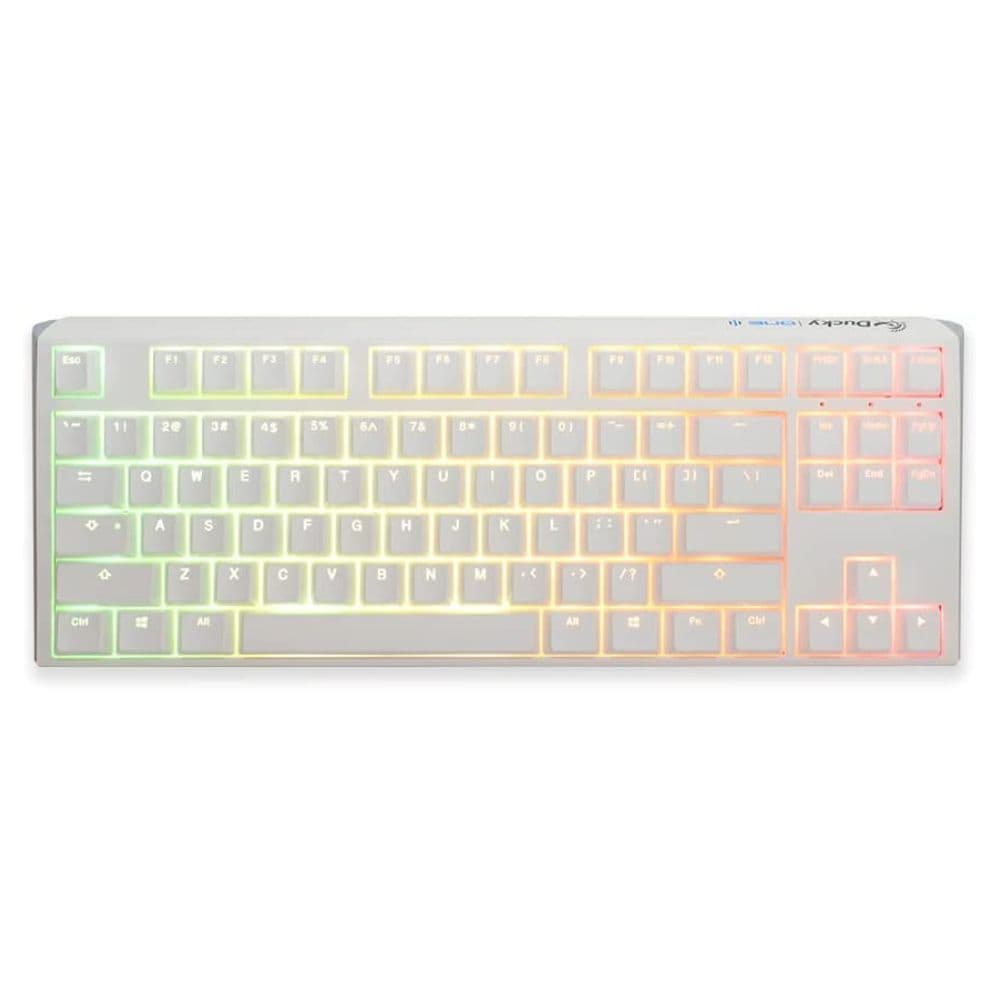
Ducky One 3 TKL
Great from the get-go
A great experience right out of the box
The Ducky One 3 TKL is a colorful keyboard that delivers a uniform typing experience with a muted sound profile, thanks to the case foam and silicone dampening under the switch plate. It is available in various color options with or without per-key RGB backlighting, in an all-plastic case. The latter may seem like a letdown, but it helps the sticker price of this keyboard.
Pros
- Three-level adjustable tilt
- Recessed connector with multiple cable routing options
- Built-in sound dampening
Cons
- Case design places wrist rest farther away
- No QMK & VIA support
- Plastic construction doesn’t feel premium
The Ducky One 3 TKL is a spirited, colorful keyboard designed to be the centerpiece of your desk setup, even without help from RGB lighting. There’s no denying the old-world charm of the chiseled edges and muted colors. Like most other recommendations on this list, the Ducky One 3 is a tenkeyless board, but the same colors are also available for the full-size model if that’s more your style.
Although this plastic keyboard has a metal frame, it is still adequately premium. Ducky uses PBT plastic keycaps, which don’t develop a shine over time and sound deeper from the get-go — the perfect pairing with case foam and the silicone dampening for a mute but deep sound. It also comes with the original Cherry MX switches that pioneered the market for so-called replicas and other enthusiast switches. The Ducky’s design could mandate a wrist rest, but it won’t sit too close to the keyboard because of the fat chin. On the underside are a few cable routing options and a recessed USB-C connector, so you can route the wire to go off your desk optimally.
The Ducky One 3 is one of the few premium keyboards which doesn’t have a categorically premium price tag. It could have benefitted from adding open-source firmware like QMK and VIA, but that isn’t a major demerit because the layout is standard. This is a great keyboard for anyone wanting a bit of color, a muted keyboard, and several switch choices.
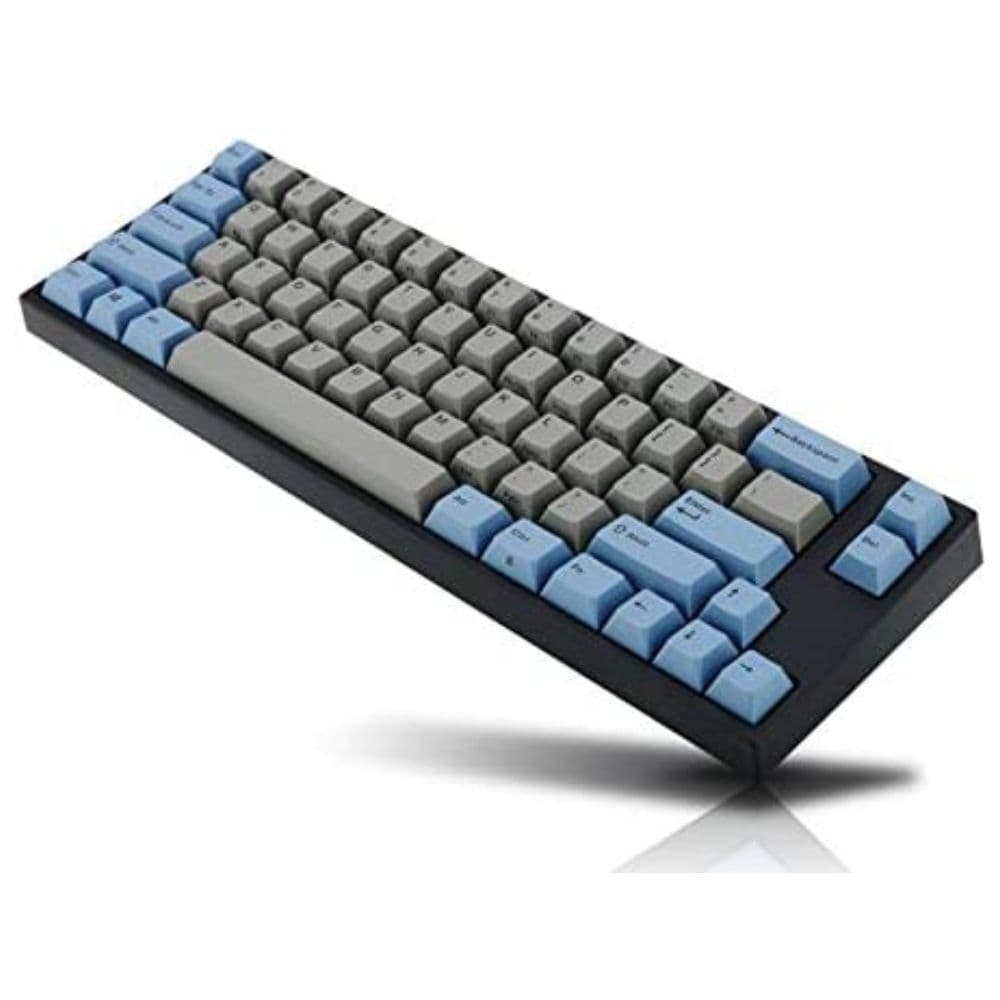
Leopold FC660M
Retro goodness
Skipping modern amenities to stay period-correct
Many enthusiasts today are fond of mechanical keyboards because they miss how typing on the beam spring keyboards felt like. With authentic Cherry MX switches and a retro aesthetic to match, the Leopold FC660M delivers a properly nostalgic typing experience. However, you won’t sacrifice modern conveniences like wireless connectivity via Bluetooth.
Pros
- Removable batteries
- Silent switch options available
- Four Dip switches
Cons
- Only six-key rollover
- No hot-swap sockets
- Outdated Mini-USB port
Back in the day, most keyboards were all-plastic, lacked backlighting, and missed hot-swap sockets. The Leopold goes all-in on the retro aesthetic, even mimicking these now-negative traits of its ancestors. If you can look past these points, you’ll find a great keyboard with retro appeal. You can use this in wired mode or as a wireless Bluetooth peripheral powered by two removable AAA batteries, which is a rare convenience.
Buyers may miss out on N-key rollover and the versatility of USB-C, but this keyboard has an ace up its sleeve in dip switches — a hardware toggle that changes the default function for certain keys with zero software tinkering. The Leopold has four of these dip switches, so the smaller form factor doesn’t leave you missing keys.
The Leopold FC660M is the ideal buy if you want a functional addition to your setup that’s a silent nod to the history of keyboards without being overly flashy. However, we cannot recommend this for gamers because of the key rollover limitation and lack of hot-swap sockets. Pricing mostly stays steady, so don’t wait for a deal price drop if you dig this aesthetic.
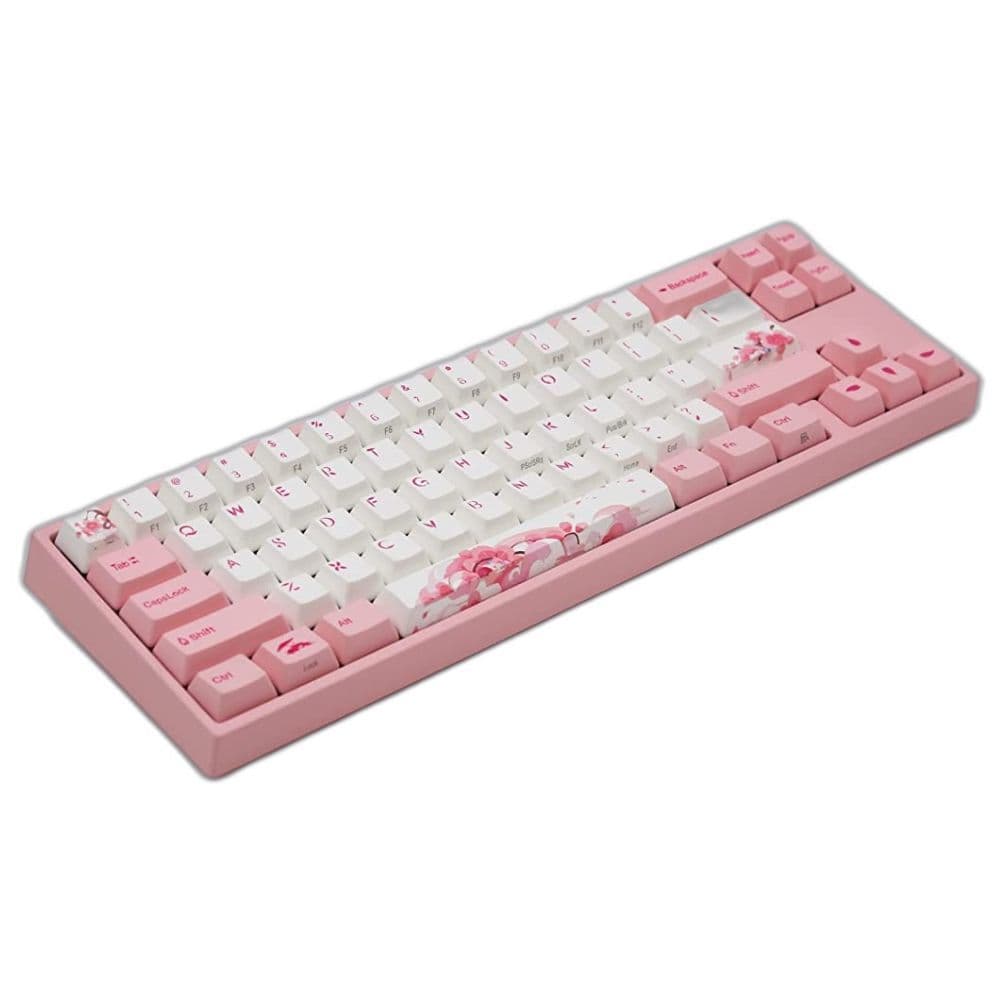
Varmilo x Ducky x Miya Pro R2
Best unique board
The fruit of collaboration
The Ducky Miya Pro, co-developed with Varmilo, uses an assortment of great features to stand out, such as the PBY keycaps, case foam dampening, and genuine Cherry MX switches. This affordable variant of an all-aluminum Varmilo keyboard also uses a standard shrunken-down layout.
Pros
- Cherry MX silent switch options
- Unique EC switch options
- Color-matched case and keycaps
Cons
- Plastic case uses press-fit tabs
- Backlight bleeds through pink keycaps
- Mac model is a separate product
Born out of a collaboration between two big brands in the mechanical keyboard space, this keyboard gets a rather long name and a long list of switch options. Nevertheless, the latter earns the Miya Pro a spot on the list of enthusiast-grade keyboards, even though its looks may suggest otherwise. This board is a pink plastic version of the aluminum Varmilo VA68M, keeping a few nav cluster and arrow keys while skipping the function row entirely — a standard layout with a few slight changes.
At its asking price, we would have liked QMK/VIA support and screw-in fasteners instead of snap-fitting plastic tabs holding the keyboard shut because these snap-in-place clips give way with time or repeated use. This keyboard is well-built, though, with decent heft and structural integrity when fully assembled. The collaborating brands also include a spare spacebar in the box. Keycaps matching the shade of pink on the case are the icing on the cake.
While the Sakura theme may seem unique at first, there are plenty of third-party Sakura theme keycaps on sale, so make sure aesthetics aren’t the only reason you’re going for this keyboard. If you buy this beautiful board, pay close attention to your switch selection because the PCB doesn’t have hot-swap sockets. So, there won’t be an easy way to change out the switches if you aren’t content with your initial selection. On all other fronts, it’s a rock-solid purchase.
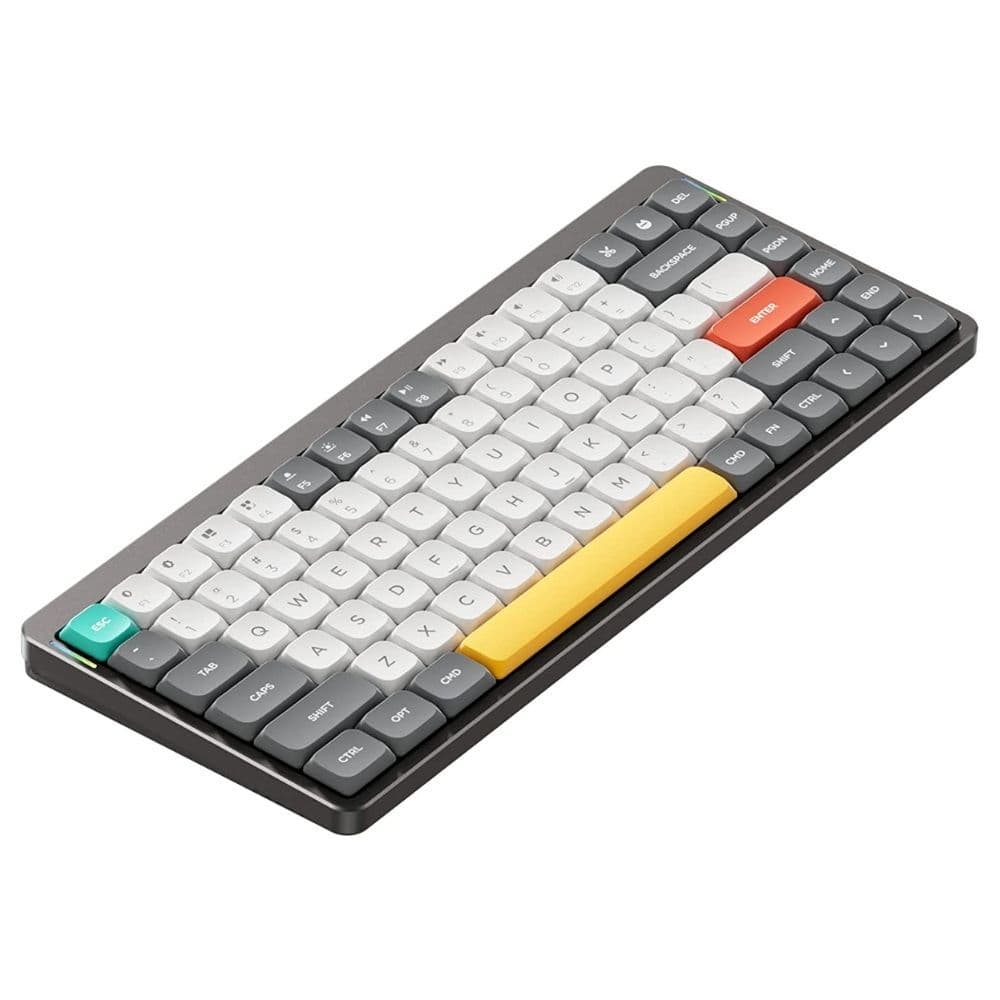
Nuphy Air75
Best laptop keyboard
Don’t tolerate your notebook’s scissor keys
Frequent travelers and design purists have a newfound affection for the Nuphy Air75 because it works like a replacement for most laptop keyboards. It sports a unique low-profile chassis, Gateron low-profile switches, and supposedly the slimmest dye-sublimated PBT plastic keycaps to keep the overall thickness down. You can simply perch this mechanical marvel atop your laptop’s keyboard and get to typing right away.
Pros
- Convenient multi-device connectivity
- Includes replacement switches, Mac keycaps
- Lightweight, and claimed to be the thinnest on the market
Cons
- Just 48 hours of claimed battery life
- Magnetic tilt adjusting feet could be misplaced easily
- Backlight merely serves as underglow
The Nuphy Air75 is a portable keyboard with two wired connectivity options besides a wired mode. Its low-profile chassis is designed as a drop-in replacement for your laptop keyboard, so you don’t miss out on the mechanical keyboard experience for scissor switches.
Unlike the Perixx keyboard using Kailh Chock switches, the Gateron low-profile switches of the Nuphy retain the Cherry MX cross-stem design, making finding replacement keycaps easy. Mac-specific keycaps and a few replacement switches are included in the package, so you can use this with your MacBook with no problem. The Nuphy is also hot-swappable, allowing you to use any other low-profile switch. Two forms of wireless connectivity are available, but the 2,500mAh battery life leaves much to be desired, especially when the backlight is switched on.
Instead of flip-out feet like most other mechanical keyboards, Nuphy uses magnetic snap-on feet. It is a novel idea, but we fear one could easily accidentally misplace the magnetic feet. That said, there’s no better mechanical keyboard for sale right now to serve as a drop-in replacement for your laptop keyboard, be it a Chromebook or a MacBook. A full list of compatible devices is available on Nuphy’s website.
Embark on the quest for your ‘endgame’ mechanical keyboard
It can be quite an arduous task to pick out the perfect mechanical keyboard for your requirements. However, the innate beauty of these products and their scope for additional customization and modification means you can build them to suit your tastes. However, if you’re just dipping your toes in the hobby, we suggest sticking to an affordable hot-swappable keyboard like the Redragon, so you can establish your switch preference before paying top dollar for an aluminum board.
If you have spent years tinkering with mechanical keyboards, or have established your preferences, the best way to pick what you need is by purchasing a barebones keyboard like the Keychron Q1 or Monsgeek M2. This way, you can choose out your stabilizers, switches, and keycaps from another vendor if you prefer, creating the ideal balance between a ground-up custom build and a pre-built keyboard with parts you won’t be using.
Veteran hobbyists could also try buying mechanical keyboards with solder PCBs, because every hotswap socket is essentially a potential point of failure. All things considered, there’s no question mechanical keyboards are in popular demand, because more and more people are realizing they deserve a better typing experience.
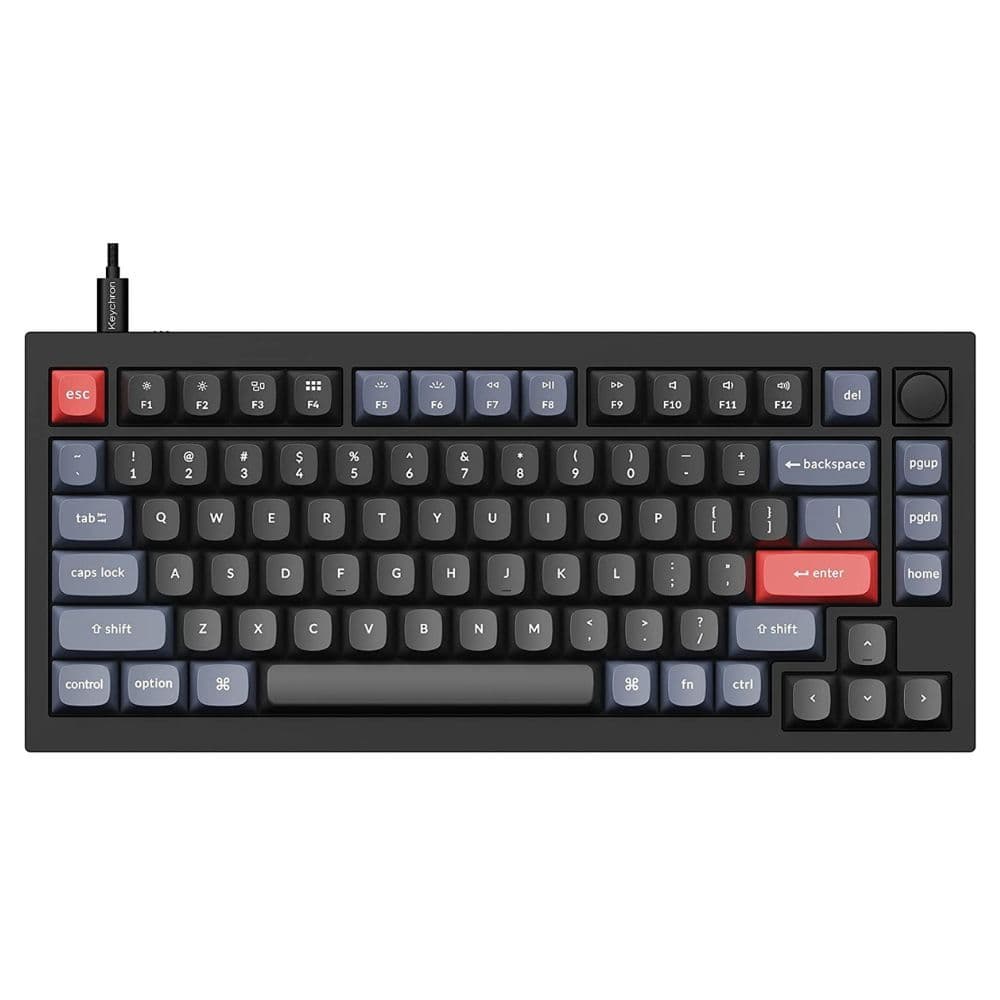
Keychron Q1 V2
Best overall
For an unbeatable typing experience
The Q1 is one of Keychron’s newer models. It features a double gasket mount mechanism, eliminating the pinging noise and hollowness associated with CNC-machined aluminum keyboards, all while allowing enough plate flex for a smooth typing experience. Dampening between the circuit board (PCB) and switch plate and inside the case also quietens a keyboard. Keychron pre-installs damping foam, making the Q1 suitable for shared spaces like offices and universities.