We may earn revenue from the products available on this page and participate in affiliate programs.
Learn more ›
Written By
John Alexander
Updated Aug 7, 2023 12:09 PM
With more and more people live streaming content, you aren’t alone if you are wondering if there are some monitors for streaming out there that perform better than average for creators and consumers of everything from unboxings to speed runs. Monitors are rarely seen when watching someone online, yet they are so vital for the whole streaming experience. For that reason, we’ve put together this round-up of the best monitors for streaming so you won’t have to hope to catch a faint reflection of them in glasses’ frames.
Thanks to the best webcams for streaming, we’ve all gotten a good look at the headsets and other accessories inside of our favorite streamer’s rooms. Some of the more observant of you might even have a solid idea of the best streaming devices and best mics for streaming already available. Well, read on and the best monitors to finish your setup will no longer be a mystery.
How we selected the best monitors for streaming
Streaming is an incredibly diverse field. In just a few hours of watching streamers you’re likely to see a huge assortment of content: From
Maya
in the great, bright outdoors working with wildlife to
MoonMoon
cursing at Mario in a dark room … from a
woodblock printmaker
showing detailed shots of his knife work to intensive screen transitions from the two-time himself,
DrDisrespect
, creators have different needs and uses for monitors.
The result is that it is difficult to select a monitor that is the very best for all streamers. Instead, we looked at monitors that are good for categories like
gaming
, sitting down and working for long hours, and also a few specialty monitors, like those that work well on the go. We also made sure to consider the current monitors of top streamers and the monitors we predicted they’d buy if they were to buy a new one right now. Combining personal experience, research on high-profile personalities, critical consensus, and user impressions, we narrowed down our list.
Best monitors for streaming: Reviews & Recommendations
Generally speaking, the best monitors for streaming are the best monitors for gaming that have a useful aspect ratio. They also tend to be monitors that keep your head and neck comfortable after many hours of streaming … gotta grind out those ranks, after all. We’ve also included an IRL streaming pick, for streaming on the go, due to the massive surge in popularity of that category. Many of them have already been top-streamer tested or belong to product lines used by your favorite eCelebrities. These are our best monitors for streaming.
Best overall:
Samsung
Odyssey G7
Why it made the cut:
This is one of the best monitors around, with a possible 240Hz refresh rate and that big-screen feel while keeping the preferred 16:9 ratio.
Specs
-
Aspect ratio:
16:9 -
Refresh rate:
Up to 240Hz -
Response time:
1ms
Pros
- Competitive response time
- Elegantly curved display
- Low eye strain
Cons
The Samsung Odyssey G7 is a monitor that provides for consistently comfortable gaming and streaming experience. With a 31.5-inch curved screen utilizing WQHD level resolution, you get that big-screen feel without sacrificing the critical 16:9 aspect ratio.
If you’re into grinding out the hours in your streamer chair, you’ll be happy to know that it also ranks as a top monitor for reduced eye strain. This is largely in part due to the max refresh rate of 240Hz and the quick 1ms response time all displayed on a comfortably curved screen. What’s even better for the streamer is the fact that these factors also contribute to getting the best KDA in the squad.
When it comes time to complain about this monitor, it can be difficult. However, there is
one
spec we just don’t like so much about this monitor: the price. While it outclasses the competition in so many ways, we just wish that this wasn’t one of them.
Best for Twitch:
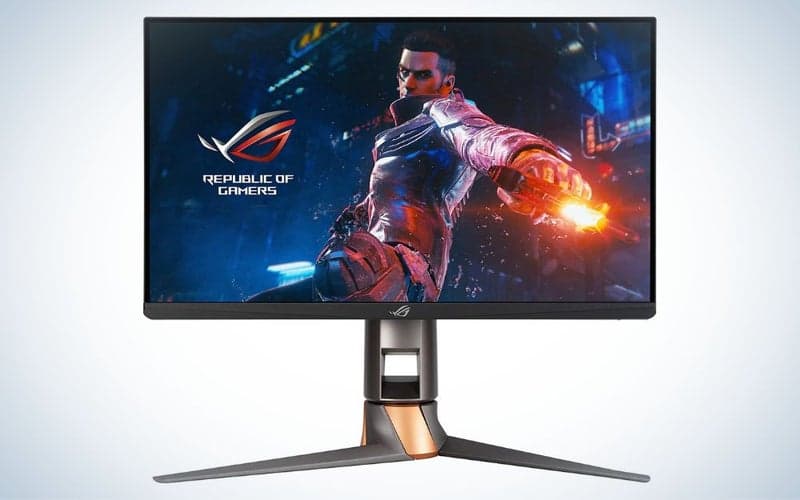
ASUS ROG Swift PG259QN
Why it made the cut:
It has a top-of-the-line refresh rate and response time with about as much eye care as you can pack into a premium gaming monitor, all while maintaining that key 16:9 aspect ratio.
Specs
-
Aspect ratio:
16:9 -
Refresh rate:
360Hz -
Response time:
1ms
Pros
- Impressively high max refresh rate
- TUV-certified flicker-free and low blue light tech
- Good connectivity (HDMI 2.0, DisplayPort, USB)
Cons
- Included stand quite large
The ASUS ROG Swift comes highly recommended for any Twitch streamer looking to make it big in FPS or battle royale games due to its hardcore refresh rate, response time, and Twitch-compatible aspect ratio. It even has great maneuverability for neck comfort and
TUV Eye Comfort Certification
for those 14+ hour weekend stream marathons. Anyone familiar with the streaming powerhouse
XQC
will find themselves drawn to this ASUS due to his time with its predecessor, the
ASUS ROG Swift 258Q
.
Aside from long hours of use, you’ll also find that the ASUS ROG Swift has great connectivity options, with USB and HDMI 2.0 alongside the somewhat better DisplayPort for the best possible frame rate.
The main irritation with this monitor is that the included stand is quite expansive. While it is sturdy and doesn’t shake easily, the stand is just about as wide as the monitor itself and has some depth to it, too. Consider using a wall mount to conserve desk space.
Best for gaming:
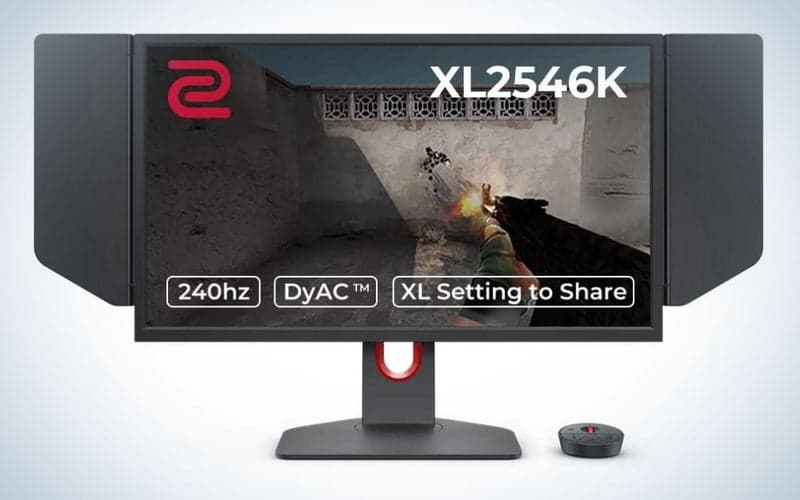
BenQ ZOWIE XL2546K
Why it made the cut:
This monitor is used by some of the best gaming streamers in the world and has the specs needed to be a top FPS player.
Specs
-
Aspect ratio:
16:9 -
Refresh rate:
240Hz -
Response time:
1 ms
Pros
- Dynamic Accuracy Plus tech for low blur
- Smaller stand base than predecessor
- Intensive response time
- FPS Pro-Grade refresh rate
Cons
- Duller colors than predecessor
Used by YouTube’s favorite medical unprofessional, DrDisrespect, the BenQ ZOWIE XL2546K is an overall upgrade to the very popular BenQ ZOWIE XL2540. While retaining a lot of the power of the previous model, it comes in an upgraded package with even more FPS-playing potential.
The Dynamic Accuracy Plus (
DyAc⁺
) used by BenQ nearly eliminates motion blur. Where the typical LCD monitor will have an intermediary softer color between a flash white and a return to black, the BenQ ZOWIE XL2546K will skip this to produce a crisp transition between colors. When coupled with a 1ms response time, this tech can give you the edge you deserve when you need to get precise headshots and track CS:GO recoil patterns down to the pixel.
We like how it compares to the previous model overall. Not only is the response time better, but it also has a much smaller base at approximately 20% smaller. We weren’t as impressed with the vividness of the colors, which appeared somewhat dull. There’s no other way to put it, though, this monitor will take the top 20% of FPS players to the next level of gaming.
Best for
live streaming IRL:
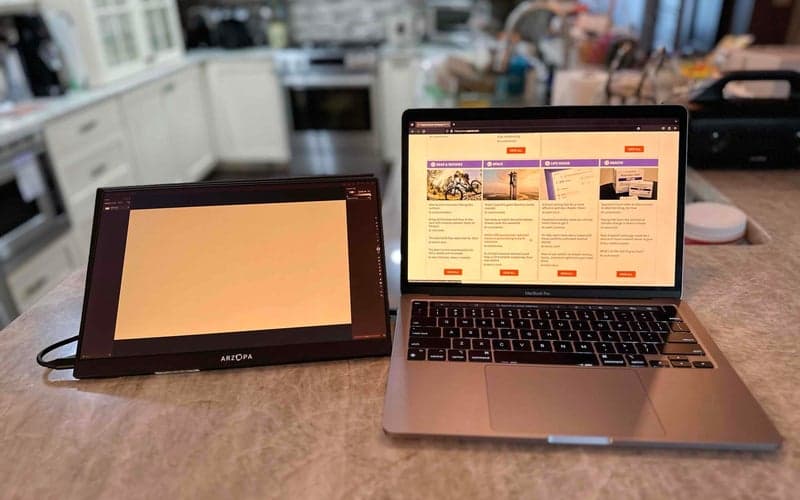
ARZOPA Portable Monitor 2K
Why it made the cut:
Arzopa’s monitor is a portable, high-resolution screen to bring to your next LAN party.
Specs
-
Aspect Ratio:
16:10 -
Response time:
N/A -
Refresh rate:
60Hz
Pros
- Compact size
- High-resolution screen
- Three inputs
Cons
- USB-C ports on one side
- Exact response time not given
If you want to bring a monitor to your next LAN party—especially to connect to a gaming laptop–Arzopa’s 2K display is our recommendation. The 13.3-inch display’s namesake
feature
is its 2K (2560 x 1600), which when combined with its support of HDR and ultra thin profile makes it a pretty powerful portable screen. In our tests, which were mostly conducted by doing office work with some light
Apple
Arcade gaming, the monitor performed well. ARZOPA doesn’t provide any response time metrics, but the 60Hz display didn’t show any noticeable lag at any point during our tests. Gamers who play first-person shooter titles may want to the company’s G1 portable display, which offers a 144Hz refresh rate but only HD resolution.
This monitor has two USB-C ports and can be powered from your computer, though the company includes a USB power adapter in the box if you don’t want to drain your computer. If you have a PC or Mac with a Thunderbolt 3 port, setting up this display during your LAN party will be a simple, single-cable affair. If your computer has an HDMI port, the company has a separate cable in the box. Once it’s connected you can control the display’s settings—brightness, color profile, contrast, etc—by pressing a switch on its left side. We recommend futzing around with these settings at home, so you can hop into a game the moment you get to your friend’s house.
Most 13.3-inch portable monitors are only 1080P, and the extra resolution on Arzopa’s 2K display will make a big difference for gamers. The ability to play titles at a higher resolution will reveal even more of its details. Plus, the portable display can be used to help you get work done when you put your controller down.
Best budget:
Acer SB220Q

Why it made the cut:
This is a reliable Acer with a price that is nearly impossible to beat, made perfect for chill “Hearthstone” card slinging or grinding TFT ranks.
Specs
-
Aspect ratio:
16:9 -
Refresh rate:
75Hz -
Response time:
4ms
Pros
- Great refresh rate for the cost
- Good enough response time for average gamers
- Image quality for everyday gaming
Cons
For many streamers, especially those starting out or who want to focus on slower-paced games, getting a super-advanced monitor isn’t a great choice. A quality affordable monitor, like Acer’s SB220Q makes a lot more sense.
Looking at the raw stats, you see a monitor that pushes way above its paygrade. The monitor has a surprisingly high refresh rate of 75Hz in a tier where you’d usually expect 60Hz. For all but the very top players, the 4ms response time of this humble Acer won’t be any different than the 1ms response times sported by some monitors over four times this one’s cost. Additionally, not all games are so twitchy and reaction-based. A Top 100 “Hearthstone Battlegrounds” player is going to do just as well on this as they will anything else.
Really, the only thing we don’t like about it is that you can’t use your own mount with it as it doesn’t have
VESA
holes. The mount it comes with is okay, but losing the potential for options is always a bummer.
Things to consider before buying monitors for streaming
The No. 1 thing to consider is what kind of streamer
you
want to be. There is always some extra that might fit your particular niche the best. Be creative and work with your audience. Despite how much they enjoy
OMEGALUL
‘ing your every failure, they really
do
care about your gaming experience, stream quality, and overall well-being. Well, at least, sorta.
Aside from niche favorites, there are some key things that pop up more frequently than others, including screen resolution, response time, and screen flicker. Aspect ratio, in particular, plays a unique role in livestreamed video gaming that you just might not expect.
Aspect ratio
For most streamers, the best aspect ratio for a monitor will be 16:9. The details of why that is the case are a bit lengthy, but worth learning if you want to stream.
Understanding what aspect ratio is and how it affects your streaming experience can be a bit tricky. Aspect ratio falls into a similar category as resolution, as it is a ratio of pixels. Where it diverges from resolution, however, is that it directly describes the rectangular shape of your screen.
The aspect ratio of your monitor can give you a good idea about how it will look. A 2:1 aspect ratio monitor could be 2 feet across and 1 foot up OR 6 feet across and 3 feet up. The vertical-to-horizontal ratio stays the same.
Stream hosting sites have standard viewing windows that can adjust to different viewers’ browser window sizes. Twitch and YouTube both default to 16:9 for this. Try changing your browser window size while watching a stream and see the display automatically adjust. The website automatically adjusts the image size to fit your window based on the aspect ratio selected.
How does this translate to the streaming experience? When aspect ratios don’t match, stream hosting services have to squeeze everything into a smaller space, shrinking the visible area. This can also happen even if you adjust the aspect ratio of your stream away from the 16:9 default if your viewers don’t have equivalent monitors to match.
To get around this, ultrawide streamers have to play games windowed, use specialized software, or find some other way around the issue. The result is a friction between what the viewer and streamer see on the screen, which is undesirable for all. Again, it is best to keep to a 16:9 ratio for a streaming monitor, or keep as close to it as possible.
Refresh rate
Refresh rate is going to be something that affects you, the streamer, directly more than it does the audience. While lower refresh rates can contribute to eye fatigue, which possibly lowers stream length, the biggest deal will be when you’re trying to edge out those headshots in FPS games or avoiding getting ganked in your MOBA of choice.
Refresh rates are measured in Hertz, or Hz, and reflect the number of times per second that a monitor’s image refreshes. The higher, the better, these typically start at around 60 Hz and start to level off around 144Hz, but there are those that go beyond.
For slow, tactical games like “Sid Meier’s Civilization” or casual “Hearthstone BG” runs, this won’t be a huge factor for you. However, when you’re in a 3-on-1 situation in the last minutes of a battle royale, it could make all of the difference in the world.
Response time
Another metric of screen changes, response time tells us how fast it takes a pixel on the monitor to go from one color to another. Measured in milliseconds, the testing usually covers the time to change from white to black or one shade of gray to another.
Much like refresh rate, above, this can make a lot of difference to your performance while playing fast games, especially FPS games. Additionally, it is another factor in the trailing white line behind your rapidly moving white cursor on dark-mode’d websites.
You should strive for a response time around 5 milliseconds or less, but a little bit over won’t affect the average individual too much. To put it into perspective, a blink takes about 150 milliseconds, so an extra millisecond or two in your monitor’s response time isn’t going to make a huge difference unless you’re in the top few percent of players in your game.
FAQs
Q: How much does a monitor for streaming cost?
A monitor for streaming can cost anywhere from just over $100 to well over $500. When budgeting for a monitor for streaming, you should consider at what level your streaming will be done at. While it is tempting to imagine yourself shooting up into the ranks of streamer stardom, the average streamer on Twitch will never clear 100 viewers.
Q: Can I stream with only one monitor?
You can stream with only one monitor, but it is advisable to use two. Typically, you’ll want to have your main monitor full-screened with the game you’re playing and use a second monitor to keep an eye on the chat. This gives you a chance to keep up with the conversation, actively ban bad actors before the chat gets derailed, and provide a better sense of community to keep viewers coming back.
Q: Do monitors affect streaming?
Yes, monitors affect streaming. For one, the aspect ratio you use affects how viewers see what you’re streaming. That’s why we recommend a standard 16:9 aspect ratio. Next, a monitor can also affect your performance as a gamer or monitor user. High-quality monitors can take top-tier gamers to the next levels in reaction-intensive genres, like FPS. Low-quality monitors that hurt your eyes, on the other hand, will make streaming feel monotonous and more like a chore than a passion. The result will be a low-energy stream without the hype required to get viewers to smash that follow button.
Final thoughts on the best monitors for streaming
Getting a high-quality gaming monitor, like the Samsung Odyssey G7, is going to go a long way for you in your streaming career or hobby. At the same time, I also feel certain that any of the monitors on our list (except the ZenScreen) has all of the qualities necessary to be the main monitor for any person ready to start dedicating themselves to streaming. Now, go order your monitor, say your “Kappa 1, 2, 3” and get that stream started!
Why trust us
Popular Science
started writing about
technology
more than 150 years ago. There was no such thing as “gadget writing” when we published our first issue in 1872, but if there was, our mission to demystify the world of innovation for everyday readers means we would have been all over it. Here in the present, PopSci is fully committed to helping readers navigate the increasingly intimidating array of devices on the market right now.
Our writers and editors have combined decades of experience covering and reviewing consumer electronics. We each have our own obsessive specialties—from high-end audio to video games to cameras and beyond—but when we’re reviewing devices outside of our immediate wheelhouses, we do our best to seek out trustworthy voices and opinions to help guide people to the very best recommendations. We know we don’t know everything, but we’re excited to live through the analysis paralysis that internet shopping can spur so readers don’t have to.