

The Best Steam Deck Accessories in 2023
The Steam Deck has become a smash hit among PC gamers looking for a more portable experience while preferring the familiarity of the Steam ecosystem. All consoles, however, can have their user experiences enhanced by pairing them with the right accessories, and the Steam Deck is no exception. The Steam Deck is great out of the box, but the extra features and durability that some accessories can add make a huge difference when it comes to the Steam Deck experience.
-
Steam Deck
-
Anker 341 7-in-1 USB-C Hub
The Best Docking Station For The Steam Deck
-
Anker 537 Portable Charger
Best Portable Power Bank For The Steam Deck
-
PS5 Controller
The Best Controller For the Steam Deck
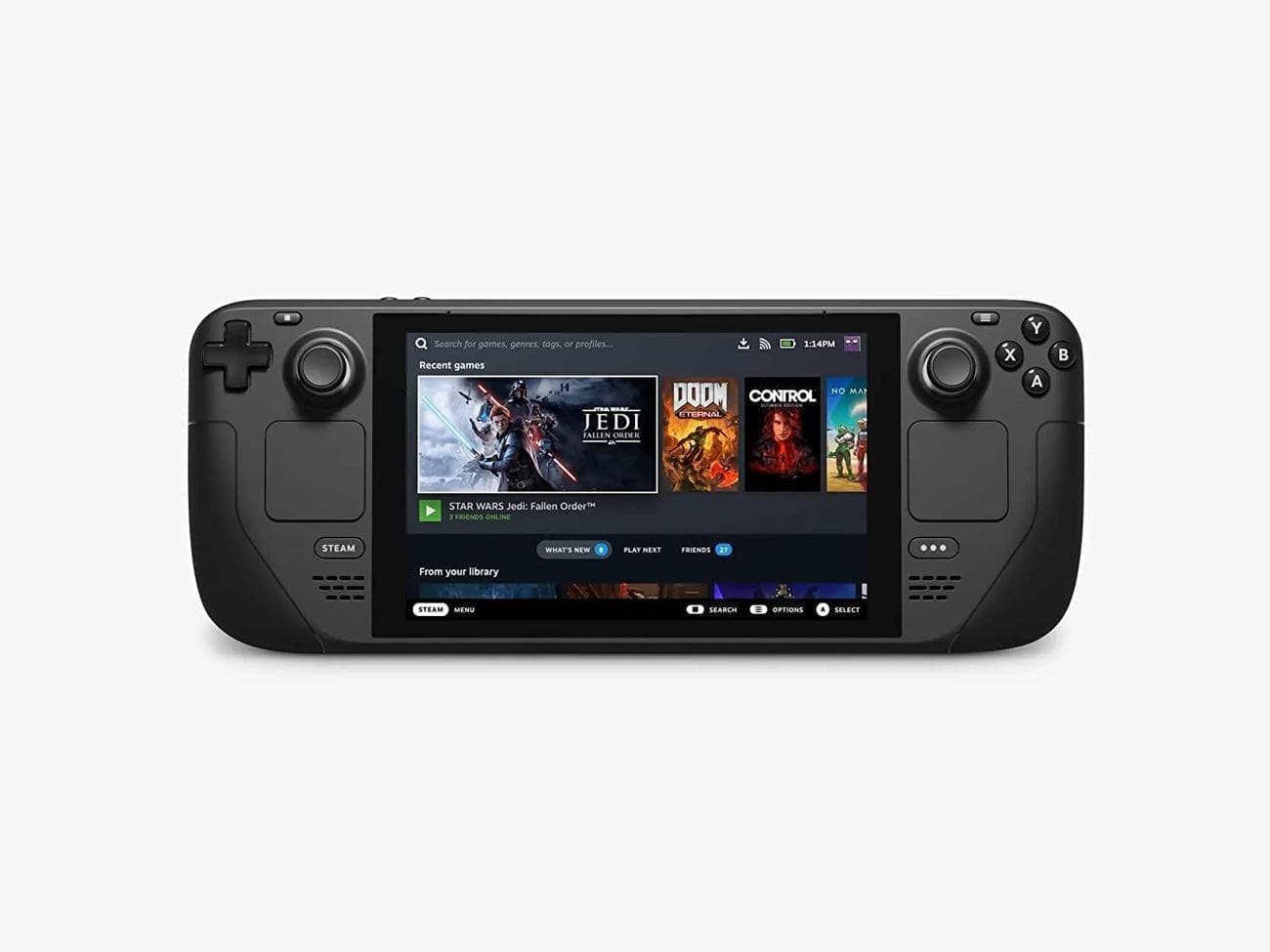
Steam Deck
Valve’s long-awaited portable console is here, and it’s taking the handheld gaming market by storm. Valve partnered with AMD to create Steam Deck’s custom APU, optimized for handheld gaming. It is a Zen 2 + RDNA 2 powerhouse, delivering more than enough performance to run the latest AAA games in a very efficient power envelope.
When picking out new accessories for the Steam Deck, there are some factors that should be considered first before diving in.
-
Define Needs
: What needs to be improved with the Steam Deck experience? -
Creature Comforts
: What accessories will make the Steam Deck harder to put down? -
Value For Money:
What accessories fit in the budget, and what items are worth expanding the budget for? -
Safeguard The Steam Deck:
How should the Steam Deck be protected to ensure it stays safe while in transport or normal use?
Anker 341 7-in-1 USB-C Hub
The Best Docking Station For The Steam Deck
Affordable, Compatible & Compact
The Anker 341 7-in-1 USB-C Hub is a compact hub that can connect monitors transfer data, and deliver a charge to any device with a USB-C Port. This hub features power delivery pass-through, which allows devices with just one USB-C port to connect to other devices and still charge up to 85 watts.
The 2X USB-A and 1X USB-C ports transfer up to 5Gbps, and the HDMI supports up to 4K 30Hz.
-
Brand
-
Anker
-
Connection
-
UBS-C
-
Ports
-
2x USB 3.0, 1X USB-C Data, 1X HDMI, SD and Micro SD Card Slot, USB-C Power Deliver
-
USB-C Power Delivery
-
85 Watts
Pros
- Very compact and easy to move around with the Steam Deck
- Supports USB-C PD Power Pass-through up to 85W (Does not function as a charger)
Cons
- Only supports 30Hz at 4K thanks to HDMI 2.1 limitations
As with most devices today, the Steam Deck has a USB-C port that is only I/O. Luckily, there are a ton of USB-C hubs on the market to fix that. The best bang for the buck USB-C hub for the Steam Deck is the Anker 341 7-in-1 hub. Priced at $35, it is hard to find a hub that offers this much expansion and power for a better price. Also, unlike some other hubs, this one has power pass-through, so while it is connected, the Steam Deck can be charged with up to 85 watts of power.
The only major downside of this dock is that the HDMI at 4K only supports 30Hz, but with the resolution lowered to 1080p, 60Hz is available for those faster-paced games. Notably, the Steam Deck is not powerful enough to run most games at 4K 60Hz (or 60 FPS) and players would have to turn down the graphical settings to achieve a stable 60Hz at 1080p.
Anker 537 Portable Charger
Best Portable Power Bank For The Steam Deck
A multifunctional adapter
The Anker 537 Portable Charger is a power bank that can power way more than just a phone. With a 65W total output and two USB ports, the power bank delivers high-speed charging for two power-hungry devices simultaneously. With 24,000 mAh, this battery can charge a MacBook Pro for up to 4.8 hours.
When the Anker 537 does eventually run out of juice, it takes 3.5 hours to fully recharge the battery.
-
Brand
-
Anker
-
Battery Capacity
-
24,000 mAh
-
Ports
-
1X USB-A, 1X USB-C Output, 1X USB-C Input
-
Weight
-
1.1 Pounds
-
Dimensions
-
6.3 x 3.34 x 1.04 inches
-
AC Charge Time
-
3.5 Hours
Pros
- Up to 65 watts of power delivery (PD) via USB-C
- Recharges the Steam Deck in 3.5 hours
Cons
- No wireless charging
- Volumetrically larger than the Steam Deck’s own charger
A Steam Deck is all about having powerful PC gaming on the go. So why not get a portable power bank that can more than keep up with the Steam Deck? The Anker 537 Portable charger offers 65 watts of power delivery, which is comfortably over the 45 watts the Steam Deck can consume at max charge speed. It has 24,000 mAh of juice in the tank, which should keep the Steam Deck charged and ready to go for a while.
When this battery eventually runs out of charge, plug it into an AC charger, and it will be back to a full charge in just 3.5 hours. If this does find a spot in the bag, be aware that it is pretty heavy, weighing 1.1 pounds. The Anker 537 Portable charger can be used alongside the Anker 341 USB hub as it supports pass-through power.
Dbrand Project Killswitch
The Best Case For The Steam Deck
Premium Rugged Beast
Dbrand’s Project Killswitch is a hard rugged case for the Steam Deck. Made with incredible precession and thin protective material to make sure your Steam Deck is protected wherever it goes.
Included with the case is one of Dbrand’s skins for the Steam deck that also happens to fit over the case perfectly.
Pros
- Textured grips for an excellent handheld experience
- Rugged protection that ensures your Steam Deck remains secure
- Kickstand to allow for more comfortable gaming sessions
Cons
- Priced at a significant premium
Despite its rather rough launch, the Project Killswitch Steam Deck case is one of the best options as a protective case for the Steam Deck. Dbrand is known for making excellent
cases
and skins for a variety of products, and this case is no different. It feels great in hand, and the textured material adds a good amount of grip without being too much.
If more protection is needed, Dbrand also offers the
Travel Kit
, which comes with a shell to protect the front of the Steam Deck for extended transportation.
PS5 Controller
The Best Controller For the Steam Deck
Bringing Sony’s Best To Steam
The DualSense wireless controller for PS5 offers immersive haptic feedback adaptive triggers and a built-in microphone. In addition, the built battery should get you through the longest gaming sessions at 1560 mAH.
This controller is built with high performance and personalization in mind while retaining all the immersive features of the DualSense wireless controller. The built-in microphone and headphone jack make it simple to connect headsets for multiplayer chatting or headphones for more immersive audio.
-
Brand
-
Sony
-
Platform
-
PS5, PC, Android, and iOS
-
Battery
-
1560 mAh
-
Connectivity
-
Bluetooth, Wired USB-C
-
Headset Support
-
Yes
-
Programmable
-
Yes
-
Extra Buttons
-
No
Pros
- Low-latency Bluetooth connection
- Excellent ergonomics that also lets you use the trackpad as a cursor
- Adaptive triggers can be used with a workaround
Cons
- Shorter battery life than most competing controllers
Being able to set down the Steam Deck on a kickstand or dock and play with a controller adds a whole new play style, kind of like the Switch with its kickstand. Of course, with the help of a USB-C hub, a wired PC controller can be used, but that ruins the sleek package that the Steam Deck offers. Instead, a wireless Bluetooth controller is the way to go, and right now, there is no better option than the PS5’s DualSense controller from Sony. It offers an excellent controller experience overall, and like Valve’s controller, it also has a trackpad that can be used in place of a mouse.
A Bluetooth connection is finicky at best sometimes, but with the DualSense controller, the Steam Deck has no issues pairing and keeping a stable connection. The only downside of this controller is the fairly small battery inside, which usually only lasts around 10 hours. For people who don’t regularly charge their controller, that might be a problem.
With that said, most wireless controllers with Bluetooth will work with the Steam Deck in case there is one lying around the house.
SanDisk Ultra microSD card
Best SD Card For The Steam Deck
Affordable
Storage
Upgrade
The SanDisk Ultra microSD card comes in sizes ranging from 64GB to 1TB. With up to 150 MB/s transfer speeds to move up to 1000 photos per minute. This card is rated Class 10 which can handle full HD
video
recording and playback.
-
Brand
-
SanDisk
-
Capacity
-
64GB- 1TB
-
Flash Memory Type
-
Micro SDXC
-
Hardware Interface
-
Micro SD
-
Speed (Read, Write)
-
150 MB/s
Pros
- Doubles Steam Deck storage or more depending on the version
-
Fast
read and write times compared to standard SD cards - Excellent value compared to higher-end Steam Deck models or SSD upgrades
Cons
- Significantly slower than any SSD alternatives
With the Steam Deck topping out at 512 GB of storage and most modern-day PC games requiring 30-60 GB, expansion storage is almost a need for the Steam Deck. The SanDisk Ultra MicroSD card fits the bill perfectly, ranging from 64 GB to 1 TB, so everyone has a price point to choose from that will best suit their needs. Do keep an eye on the cards lower than 128 GB though, because they tend to have slower read-write speeds, which can dramatically affect the game’s performance and download speeds. The 512GB model is rated for up to 150 MBps read speeds.
SABRENT Rocket 1TB NVMe SSD
Best SSD Upgrade For The Steam Deck
Fast, Pricey Storage For Your Deck
The Rocket NVMe 2242 SSD delivers amazing speeds, unmatched reliability, and capacity options of up to 2TB in a small package.
All Sabrent SSDs come with a copy of Acronis True Image for Sabrent, a simple-to-use cloning software, to make sure all of your data is safe.
-
Storage capacity
-
256 GB – 1TB
-
Hardware Interface
-
NVMe
-
Brand
-
SABRENT
-
Transfer rate
-
Read 4750 MB/s, Write 4300 MB/s
-
TBW
-
600TB
Pros
- Very fast read/write speeds
- Adds at least 2 times the storage capacity (depending on the Steam Deck model)
- Comes recommended and used extensively for Steam Deck upgrades
Cons
- Requires opening Steam Deck
If a MicroSD card is not going to cut it, replacing the stock SSD that Valve puts in the Steam Deck is the best way to go. The Sabrent Rocket 1TB NVMe SSD is compatible with the Steam Deck and will replace the old SSD perfectly. The process requires a little bit of surgery, and one needs to be confident in the ability to disassemble the Steam Deck.
Luckily, iFixit has a
great guide on how to take apart the Steam Deck.
If safe electronic tools to use for this process are unavailable, it is recommended to pick up a set to ensure that everything goes smoothly because a Steam Deck with a new SSD is great, but a bricked Steam Deck is not.
Deckmate Full System
The Best Multi-purpose Accessory For The Steam Deck
The Deckmate Full System is a versatile accessory for the Steam Deck. It comes with two grip options that allow different accessories to be attached to the Steam Deck. The system includes four accessories including a kickstand, a VESA mount, a wall mount, and a universal puck. Depending on where and how the Deck is being used, players can easily swap out one accessory for another and get a comfortable gaming experience. The parts in the kit can also be 3D printed and assembled as a DIY project.
-
Type
-
Steam Deck accessory
-
What’s Included
-
1 Deckmate grip, 1 kickstand, 1 Wall mount (with anchors and screws), 2 adhesive pucks, 1 VESA mount (with 4 screws), 1 Universal Adapter
-
Brand
-
Deckmate
-
Compatibility
-
Steam Deck
Pros
- Multiple accessories on a budget
- Can be 3D printed at home
- Makes the Steam Deck more comfortable to use
Cons
- Requires additional parts for assembly if 3D printed
- Cannot be used with a case
The Deckmate system is a unique and seamless way to add more functionality to the Steam Deck. The entire system comprises four different attachments: a kickstand, wall mount, VESA mount, and a universal puck, along with two grip styles – a standard grip and a universal adapter. Both the standard grip and the universal puck can be attached to the Steam Deck to use the different accessories.
The standard grip must be attached directly to the back of the Steam Deck while the universal adapter can be attached to the back of a case if one is being used. With the grip in place, the accessories can be easily clipped on depending on where the Deck is being used. It should be noted that if the standard grip is attached to the back of the Deck, it may not fit in a case.
The great part about this kit is that it can be 3D printed and the files are available for free. There are some screws, springs, and tools required for assembling the accessories if Steam Deck owners decide to 3D print the parts for themselves. Alternatively, it can be purchased with all the parts required for assembly.
Razer BlackWidow V3 Mini HyperSpeed
The Best Gaming Keyboard For The Steam Deck
RGB Mechanical Wireless Supremacy
$110
$180
Save $70
Compact enough for any space and versatile enough for all setups. The Razer BlackWidow V3 Mini HyperSpeed allows gamers to enjoy seamless gaming in a sleek package with a wireless 65% mechanical gaming keyboard that perfectly balances form and function.
The keyboard has three connectivity modes, which allow it to be used with convenient Bluetooth, lag-free wireless 2.4 GHz, or using USB Type-C cable.
-
Brand
-
Razer
-
Wireless
-
HyperSpeed Wireless (2.4GHz), or Bluetooth
-
Backlight
-
Yes
-
Media Controls
-
No
-
Battery
-
Up To 200 Hours
-
Num Pad
-
No
-
Switch Type
-
Razer Yellow or Green Mechanical
-
Wired operation
-
USB-C
-
Material
-
Aluminum construction
-
Bluetooth
-
Yes
-
Multi-device pairing
-
Yes
-
Keycaps
-
Doubleshot ABS keycaps
-
Polling rate
-
1000 Hz
Pros
- Allows multiple devices to be connected simultaneously
- Offers 3 different connectivity options: Wireless BT, Wireless dongle, USB-A (or USB-C to C cable)
- Excellent non-RGB battery life for a wireless mechanical keyboard
Cons
- Somewhat clunkier than most of its direct competition
- Burns through its rechargeable battery life quickly when using RGB
With the Steam Deck technically being a computer, having a keyboard can make the Steam Deck feel like much more than just a portable gaming console. Now there are many options for small wireless keyboards out there, but many of them skimp on the specs that gamers are looking for. The Razer BlackWidow V3 Mini HyperSpeed, however, does not.
This keyboard uses the 65% layout to make it compact and easy to transport, but the overall shape is slightly chunky. Nevertheless, with the choice of Razer yellow or green mechanical switches, this mechanical keyboard is an excellent addition to any Steam Deck setup, especially for those keyboard and mouse fans. The keyboard can be connected to the Steam Deck via Bluetooth or the wireless dongle can be attached to a USB-C hub connected to the Deck.
JSAUX Steam Deck Screen Protector
Best Screen Protector For The Steam Deck
Great, Affordable Protection For Your Steam Deck’s Display
$9.99
$12.99
Save $3
The JSAUX screen protector gives edge-to-edge coverage of the Steam Deck’s screen without a loss in quality. It allows the screen to retain touch sensitivity and is still anti-scratch.
The screen protectors come with a framing guide to ensure an easy and seamless fit.
-
Brand
-
JSAUX
-
Compatibility
-
Steam Deck
-
Material
-
Tempered Glass
-
Finish Type
-
Glossy
Pros
- Extremely easy to apply thanks to the included guiding frame
- Offers excellent protection without compromising on touch sensitivity for the Steam Deck
Cons
- Glossy screen negates Steam Deck’s anti-glare finish
Screen protectors can be the best or worst accessory to pick up for a device, depending on the quality. The lower-end protectors tend to leave bubbles and trap dust underneath when applying them, creating a frustrating experience. On the other hand, the JSAUX screen protector for the Steam Deck adds an excellent level of protection, and the included frame guide and tools make the installation easy.
The only downside of this overall excellent screen protector is the glossy coating that makes the anti-glare screen on the higher-end Steam Deck models useless. However, unless playing in direct sunlight, it does not make it unusable in brighter lighting conditions.
Dbrand Steam Deck Skin
The Best Skins For The Steam Deck
Excellent, Customizable Skins
Dbrand skins are all precisely cut to ensure a proper fit, with no annoying overhangs or bubbles. Besides looking great, all of their skins offer scratch resistance.
Don’t worry about guessing where these skins will go because Dbrand has video tutorials for each device they sell skins for, making the whole process extremely simple.
-
Brand
-
Dbrand
-
Compatibility
-
Stean Deck
Pros
- Precise fit for Steam Deck
- Provides scratch protection as a de facto offering on its Steam Deck skins
- Easy to swap out without leaving residue
Cons
- Somewhat pricier than the competition
Dbrand offers some of the best skins for various devices, and now they also offer ones for the Steam Deck. Choose from the huge selection of options to make the Steam Deck unique, including the ever-popular tear-down skin, with an accurate layout of the Steam Deck’s internals. All of their skins have explainer videos to help everybody through the process and ensure that there are no bubbles or overhangs anywhere.
How to Choose the Best Accessories for The Steam Deck
Before buying accessories for the Steam Deck, there are some things to keep in mind. Buyers will want to define their needs and creature comforts as well as safeguard their purchase and consider the value of accessories.
Define Needs
Not all products available for the Steam Deck will have utility for everyone. While there may be a temptation to buy the latest and greatest accessories for everything related to the Steam Deck, prioritizing according to one’s needs is important. For example, an SSD upgrade might be a better, more practical purchase versus a travel bag if traveling with the Steam Deck is not in the cards, but the storage crunch is preventing downloading new games, thanks to the Deck’s limited capacity.
Likewise, going with the cheapest option is definitely tempting when it comes to the JSAUX screen protector listed above, but also consider if the slightly more expensive dual-pack blue light or anti-glare options will be more useful instead. The latter makes a lot of sense as a purchase if a lot of time is spent outdoors in the sun and the Steam Deck is expected to behave as a portable console option.
Creature Comforts
In a similar but almost opposite vein as the last point, creature comforts make devices enjoyable to pick up and make it hard to put down. For the Steam Deck, these can be things like a keyboard and mouse for longer gaming sessions or a customizable skin that makes the Steam Deck look really cool. These accessories are not always the most practical, but they can enhance the experience.
Value
Many of these picks are some of the best for their product classes. Cheaper options do exist, as they should in a market catering to an entire console. However, cheaper accessories, such as console skins, might cause long-term losses on the console investment by making it harder to use or get these off.
At the same time, it might feel that some items are considerably dearer than others. While this guide makes an effort to highlight if a particular product is more or less expensive than its immediate competitors, opinions might differ on the threshold of what the price is. Researching and reading through the comprehensive guide and the provided specifications and pros and cons listed for each product should help make a better, informed decision.
Safeguarding The Steam Deck
Finally, last but not least, owners will want to keep their Steam Deck safe. Almost every accessory discussed here is optional, but keeping the Steam Deck safe is not. Now that doesn’t necessarily mean that everyone with a Steam Deck has to buy the most rigid case out there, but it does mean getting something that keeps it safe for how it is used.
If the Steam Deck sees a lot of travel, it is recommended to get a carrying bag and case to keep it safe from any potential drops or scratches. But if the Steam Deck mostly lives at home, a bulky case might be a bit of overkill. A screen protector and a bag that will keep it relatively safe for a couple of trips out are perfect.
At the end of the day, all these fun accessories are no good if the Steam Deck falls and breaks.
FAQ
Q: Is Steam Deck worth the hype?
For PC gamers who do not want to be tied to a desktop or laptop, the Steam Deck is well worth the hype. Of course, it can’t play every game like the highly visual AAA titles, but for most games, the Steam Deck has no issues.
Q: Which is better: Steam Deck or Switch?
Both the Switch and Steam Deck offer excellent performance. What it comes down to is what type of gamer you are. If you are a Nintendo gamer, then stick with the Switch if you don’t already have one. If you’re primarily a PC gamer and own all or most of your games on Steam, then the Steam Deck makes more sense
Q: Do Airpods work with Steam Deck?
Yes, the Steam Deck supports most Bluetooth products, including Airpods.
VIA:
GameRant.com