
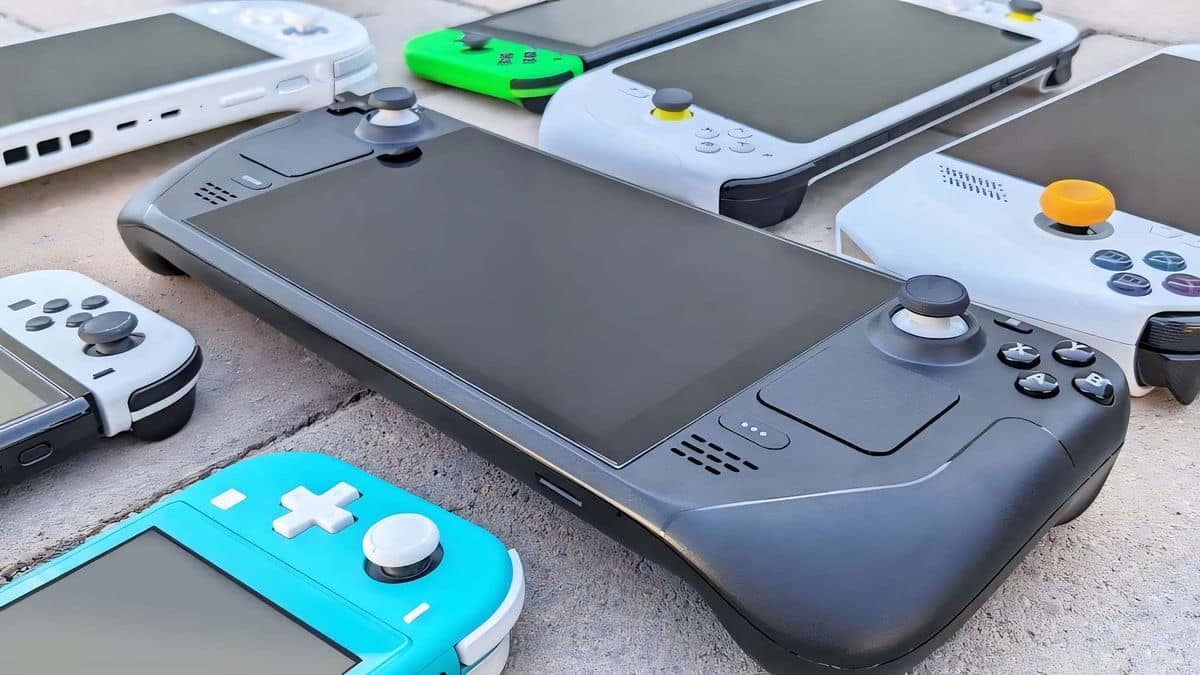
The Best gaming handhelds you can buy
When you think about the
best
gaming handhelds, your mind probably goes to Steam Deck, ASUS ROG Ally, and Nintendo Switch. While these are certainly some of the top performers in the market today, there are also several other options out there, and each can satisfy your handheld gaming needs in different ways. The specs of each device sometimes vary drastically, so I’ll be taking a look at how the best gaming handhelds differ when it comes to screens, performance, battery life, customization, and software.
These options can serve you in a number of different scenarios, or can even act like the best gaming laptops with controllers built in. Whether you’re looking for a system that provides access to exclusive games, is good for kids, plays PC games easily via Windows, offers tons of accessory options to improve the experience, or has a long battery life making it ideal for long trips, here are the very best gaming handhelds on the market today.
The quick list
Best overall
The best overall gaming handheld
Valve’s Steam Deck might not offer the very best resolution, processing power, and frame rate, but it does provide a stable platform from which to access optimized games from your Steam library. It’s very easy to use, and it’s designed around home upgrades, so you can more easily customize it the way you want.

Best Windows handheld
The best Windows 11 gaming handheld
ASUS provided one of the first gaming handhelds to run Windows 11 as its operating system. Thanks to its powerful AMD Ryzen Z1 Extreme processor, it basically functions as a small gaming laptop with controllers built into it. You can play any PC game or access any gaming services that you can on a regular Windows PC.
Read more below
Best for kids
The gaming handheld for kids
Nintendo’s handheld is actually a gaming console, which means it runs its own software rather than Android or Windows. However, it’s more geared toward children, with tons of accessories on the market and dozens of family-friendly titles. Plus, it comes with a TV dock, so you can play on TV, in handheld mode, or in tabletop mode right out of the box.
Read more below
Best upcoming option
The best upcoming gaming handheld
Lenovo might be a little later to the gaming handheld scene, but it’s bringing with it several innovative controls that should make surfing the web or interacting with certain games a whole lot easier. It has a touchpad, a mouse wheel, a right and left click button, and a special FPS mode for better in-game control. Plus, it’s got a massive 8.8-inch
display
with super high resolution.
Best for cloud gaming
The best cloud gaming handheld
Not so interested in having a small gaming laptop with controllers built in? The
Logitech G
Cloud is actually an Android device with a Snapdragon 720G. It’s ideal for streaming games over the cloud and comes with Steam, NVIDIA GeForce NOW, and Xbox Cloud Gaming installed on it. Fewer internal components make it very lightweight and easy to hold.
Read more below
Best retro player
The best for playing retro games
The Analogue Pocket is one of the most in-demand gaming handhelds right now. So much so that it’s hard to find it in stock. What makes it so cool is that it can play retro Game Boy cartridges on a beautiful backlit 3.5-inch display. It can also be plugged into a PC and used in a number of ways. Plus, you can purchase several accessories for it that allow you to play other retro cartridges or allow it to dock on TV.
Read more below
Best overall gaming handheld
The Steam Deck uses proprietary software to run optimized Steam games.
(Image credit: Rebecca Spear / Windows Central)
My recommended Steam Deck configuration:
I was fortunate enough to be one of the first people to receive my Steam Deck after orders officially opened, and since then I’ve put dozens if not hundreds of hours into this gaming handheld. Of course, I’m not the only one who loves Valve’s device, as is obvious if you read my colleague’s Steam Deck review or go online and look at the large fan base that it has. Despite not having the best specs on the market today, it’s the best gaming handheld out there right now.
It uses the Linux-based Steam OS, a semi-custom processor with limited power, and a lower-resolution 1280×800 display. The panel also suffers some significant IPS glow, so certain imagery looks more muddled and pixilated. However, the Steam Deck does provide a stable and reliable way to play specifically Steam Deck verified games from your Steam library and is one of the easiest devices to use right out of the box. The battery life isn’t amazing, only being able to reach up to eight hours depending on settings, but it does tend to run longer than several other gaming handhelds on the market right now.
What’s more, Valve was very conscious in trying to make sure that owners could upgrade the system with better RAM, storage, fans, and other hardware if they were inclined to do so. As such, many people have customized their gaming handheld to fit their gaming needs better. In fact, if you want, we can help you learn how to install Windows on Steam Deck.
There are three buying options for the Steam Deck, a 64GB version that sells for $399, a 256GB version which costs $529, and finally the 512GB version with a $649 price point. Although these are pricey, most of these options cost less than other PC gaming handhelds on the market. In the end, Steam Deck provides the most reliable and steady PC gaming experience at a more affordable price, even if it doesn’t have the most impressive specs.
Best Windows gaming handheld
ROG Ally runs Windows 11 and features software to customize various settings.
(Image credit: Rebecca Spear / Windows Central)
My recommended ASUS ROG Ally configuration:
If I’m not playing on my Steam Deck, then I’m more often then not using my ASUS ROG Ally. As you can see in my ROG Ally review, this Windows 11 gaming handheld is rather impressive with a much better screen than the Steam Deck and the ability to access any game or game streaming service that’s offered on a gaming PC such as Battle.net, Epic Games, Xbox Game Pass, and more.
The downside to the Ally is that just like with any other Windows 11 device, it tends to come installed with tons of bloatware, which you’ll want to turn off to get the best playing experience. This also means you need to be ready to troubleshoot Windows 11 issues if there is a problem, which can be daunting for some people and can make this device more complicated to use.
VRR support and the powerful processor — either an AMD Ryzen Z1 in the less expensive $599.99 version or an AMD Ryzen Z1 Extreme in the more powerful $699.99 version — help provide incredibly smooth performance with significantly higher graphics than Steam Deck offers. Of course, the Extreme version runs a bit more smoothly, so it’s best to go with that option since the two are otherwise basically the same.
ASUS’ proprietary gaming software, Armoury Crate, comes installed on the Ally and makes it easy to adjust various game settings such as FPS, resolution, RGB lighting, performance modes (TDP), and more in a side menu that gets brought up by pressing an Armoury Crate button. That way, you can make changes without having to exit a game. Now, Armoury Crate is very helpful, but sometimes it can be rather clunky and slow to respond. In these cases, it’s best to restart the system, like you would with any gaming laptop that’s giving you issues.
The ROG Ally has some serious problems that prevent it from being the best gaming handheld. For one thing, it has a very short battery life. In all my time using it, I was only ever able to get it to last for as long as four hours, but usually, it died in under two. Secondly, due to the way that the components are designed, heat being expelled by the fans can cause the microSD card slot to grow hot, which can lead to microSD card malfunctions. Obviously, losing game data is a very frustrating thing and not something to be taken lightly. Of course, if you’re solely playing with built-in storage, this won’t be a problem.
Best gaming handheld for kids
The Nintendo Switch OLED comes with a dock so you can play it on TV or in handheld mode right out of the box.
(Image credit: Rebecca Spear / Windows Central)
My recommended Nintendo Switch configuration:
The Nintendo Switch has been one of the most successful gaming consoles in history thanks to its huge library of games, more affordable price point, and innovative hybrid design that makes it both a gaming system for TV and a handheld device. It’s marketed as a gaming system for all ages and as such there are several fun exclusive games for it, including multiplayer split-screen games that you can play with family and friends from one device (as long as you have enough controllers to go around). Simply pull the two controllers off from either side of the device, turn them sideways, and you already have two controllers to use. Since the Switch comes with a dock, you can connect it to your TV right out of the box for easy game nights.
In my
Nintendo Switch OLED review
(on our sister site, iMore) I talk about how beautiful the 7-inch OLED display looks. Even though Nintendo’s handheld technically only supports a 1280×720 resolution, the OLED display makes imagery come through looking a whole crisper than you’d expect and allows for true black in imagery, so colors can really pop. This also means there’s no distracting IPS glow like what’s found in many other gaming handhelds.
Of course, graphics within Switch games aren’t super intensive to begin with, but they usually are optimized to look good on the simpler system, like with the cell-shading art style of Nintendo’s award-winning
The Legend of Zelda: Breath of the Wild
. Additionally, since the Switch has been out for so long and has been so popular, there are tons of accessories available for it to help improve your gaming experience.
The original Switch launched in 2017 for $299.99, but there’s also a handheld-only Switch Lite that sells for $199.99 and then of course the larger Switch OLED with its $349.99 price point. As you can see, these are all less expensive than most of the other options on this list. Since it’s more affordable and has a more cartoony focus (though there are adult games) it’s a great gaming handheld for kids.
Best upcoming gaming handheld
Lenovo Legion Go has unique controls like a mouse wheel, a right and left click button, and an FPS mode button.
(Image credit: Windows Central)
My recommended Lenovo Legion Go configuration:
It seems like every major tech company is coming out with their own PC gaming handhelds these days, and the latest one to join the ranks is Lenovo. It doesn’t release until
Oct. 31, 2023
, but my colleague, Zac Bowden, was already able to go hands-on with the Legion Go and “came away very impressed” by it. I’ll be getting my hands on it at some point and will do full testing to see how it compares to the likes of its closest competitors, the Steam Deck and ROG Ally.
So what exactly makes the Legion Go so enticing? For one thing, it offers the largest display of any PC gaming handheld right now at 8.8 inches with an impressive 2560×1600 resolution and excellent 144Hz refresh rate. Oddly enough, it doesn’t support VRR, though, which would help provide a stable frame rate. Now, this larger screen means that it’s the largest gaming handheld of them all, as you can see in my Legion Go size comparison. Of course, it’s hard to say how comfortable the device is to hold since this all depends on how comfortable the grips are and how well-balanced the internal components are. At this point, it could go either way.
Lenovo has stated that the Legion Go will be usable with other gaming handheld docks currently on the market. Plus, it comes with some innovative controls that we’ve never seen before on a gaming handheld such as a mouse wheel, right and left click buttons, and an FPS mode. These functions combined with the touchpad should theoretically make it easier to interact with certain games or surf the web. Additionally, the TrueStrike controllers can come off like the Switch OLED JoyCon can, but the right controller can be put in FPS mode within a small dock to act more like a mouse to give better control in games like first-person shooters.
Performance-wise, the Legion Go should operate similarly to the ROG Ally since it uses the same AMD Ryzen Z1 Extreme chipset. However, it offers a 512GB version for $699.99 and a 1TB version for $749.99, which means it has a much larger storage option than ASUS’ device. The Legion Go’s higher prices aren’t too surprising given the huge screen, innovative controls, and strong processor, but it will definitely put a dent in your wallet. Still, if you want the very best gaming handheld experience, this might be the way to get it.
The biggest way in which the Legion Go might disappoint is in regard to battery life. On devices with screens, such as phones and gaming handhelds, it’s usually the display that eats the most power and uses up the battery fastest. So having a massive screen could make Legion Go battery life even worse than ROG Ally. Lenovo might be partially combatting this, though, with the addition of Super Rapid Charge, which allows the device to charge back up to 70% in just 30 minutes, which is extremely fast. I’ll be sure to get my hands on it and test it as soon as I can to see just how it performs.
Best for cloud gaming
The Logitech G Cloud is a small Android device with controllers attached.
(Image credit: Windows Central | Zachary Boddy)
My recommended Logitech G Cloud configuration:
If you’re looking to save money on a handheld gaming device, but still want to play the latest games then the Logitech G Cloud is the choice for you, just don’t expect the best experience from it. As our own Zachary Boddy mentioned in their Logitech G Cloud review, this cloud gaming handheld holds a place between the Nintendo Switch and the Steam Deck. That’s because it runs on Android with a Snapdragon 720G, so it can play games streamed from distant servers with decent visuals, but it doesn’t have high processing power itself.
Of course, your gaming experience with any cloud gaming device is dependent upon several aspects usually beyond your control, such as your internet speed, Wi-Fi connection, and how well the host server is operating. Because of this, there are many points at which your gaming session can be negatively affected. Still, if everything is working well, then the Logitech G Cloud can be an excellent device to play on.
G Cloud comes with game streaming services like Xbox Game Pass, NVIDIA GeForce NOW, and Steam all installed and ready to go. The button layout and design feels great in your hands, but yet another problem with cloud gaming is that not every game you want to play offers controller support. You might find the games you want to play most aren’t compatible.
Since it isn’t bogged down with as many components, Logitech’s device is a whole lot lighter and more comfortable to hold. Additionally, it can last up to 12 hours on one charge, which is longer than any other device on this list. Plus, it only costs $349.99, but usually sells for $299.99 making it easier to afford. If you want to save money and understand that the cloud gaming experience isn’t always consistent, then this can be a good gaming handheld for some people.
Best retro gaming handheld
There are several accessories to purchase for the Analogue Pocket that allow it to play almost any retro game.
(Image credit: Daniel Rubino / Windows Central)
My recommended Analogue Pocket configuration:
Compared to all of the other gaming handhelds on this list, the Analogue Pocket is extremely different. However, I felt that it was important to include it since it’s such a popular device. So much so, actually, that this $219.99 handheld is hard to find in stock as it tends to sell out very quickly. The company has also released a few limited edition versions, such as glow-in-the-dark or transparent Pockets. If you want to get one, you’ll likely need to put yourself on the company’s notification list and snag one as soon as they’re available. Purchases per customer are limited to two devices.
So what exactly makes the Analogue Pocket so popular? It’s the fact that the device is designed to look like a modern Game Boy and has a cartridge slot that accommodates Game Boy, Game Boy Color, and Game Boy Advance games right out of the box. There is no emulation. One thing to be aware of is that the cartridge slot does hold these games a little loosely, but that’s likely by design for if you want to purchase one of the adapter accessories (more on that later).
The 3.5-inch LCD display might be small for some people, but it’s slightly larger than an original Game Boy’s screen and provides colorful backlit imagery with crisp 1600×1440 resolution to see retro games way better than they originally looked. Don’t worry. There are also different filters to make the screen look more like the original Nintendo system screens if you want a more faithful playing experience.
Another awesome thing about the Analogue Pocket is that there are several accessories for it that can be purchased separately such as TV docks, hard cases, screen protectors, and Pocket to Pocket Link Cables. There are even additional cartridge adapters for playing Sega Game
Gear
, Neo Geo, Atari Lynx, and TurboGrafx cartridges. If you’re a collector of retro games, then this provides a fun and modern way to enjoy them on the go.
The Analogue Pocket is charged up via USB-C cable and has a battery life of up to 10 hours, making it one of the longest-lasting devices on this list. In sticking with an ode to classic gaming systems, it doesn’t feature Wi-Fi, so whenever an
update
comes along, you’ll need to sideload it with the help of a microSD card. But you can also connect it to your PC via Sync cables and use it for music creation or other activities.
Other gaming handhelds to mention
I tested the AYANEO 2S by running several tests and playing games on it.
(Image credit: Rebecca Spear / Windows Central)
There are dozens of other gaming handhelds out there, to the point that if I listed them all, this page would be absolutely huge. But that doesn’t mean that they all deserve a place on the best gaming handhelds list. Still, here are some additional gaming handhelds that you might have heard of and should also consider.
How we test gaming handhelds
We test gaming handhelds by running them through benchmark programs as well as by playing on the devices.
(Image credit: Rebecca Spear / Windows Central)
Whenever we at Windows Central review gaming handhelds, we run the devices through rigorous testing to see how well they perform. If they are more complex devices with powerful graphics cards (basically small gaming laptops) we benchmark their capabilities against other similar devices.
This includes getting our own experience of playing graphically or computationally demanding games on them as well as running tests like PCMark Modern Office, 3DMark Time Spy, CrystalDiskMark, Cinebench, and more. How well we score a device depends on several factors, including how smoothly the device performs, how convenient it is to use, how much it costs, and how customizable it is.
Choosing the best overall gaming handheld was actually a rather close call because each device currently available has some sort of major limitation. However, the Steam Deck still managed to beat the others due to its reliable and stable playing experience, even if it can only play specific games on Steam that have been optimized for it. Of all of them, the Steam Deck is the easiest to use right out of the box and is also one of the easiest to upgrade and customize.
The ROG Ally follows right after the Steam Deck, since it provides a more liberating playing experience. With Windows 11 installed, it provides more freedom to play any service or PC game you want, but this also brings bloatware and troubleshooting issues with it. The screen and performance are significantly improved over Valve’s handheld, but that horrible microSD card slot malfunction issue is too big of a problem to be ignored. We’ll have to see how the Legion Go compares to the ROG Ally, as it’s currently the one device that might be powerful and reliable enough to beat both the ROG Ally and Steam Deck.